NDI™ (Network Device Interface) is a protocol that lets you send and receive video frames between applications in real time. It is similar to Spout and Syphon, but it works over a network. This means the apps don’t need to be on the same computer — they just need to support NDI and be connected to the same network (including Wi-Fi).
With Proxima, you can both receive and display feeds from other applications, and send your Proxima output to another program, on the same device or across the network. The protocol is already included in Proxima.
Sending the Proxima output to another app
Make sure both the sending and receiving devices are connected to the same network.
Enabling output sharing
To send the Proxima output, go to Output → Enable NDI. Proxima will then appear as an NDI source in the receiving application.
Setting up the output resolution
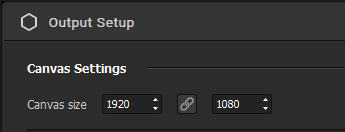
The output sent through NDI matches the size of your canvas. By default, it is 1920x1080 pixels. To change it, open the advanced output setup via Output → Setup... or  and update the resolution under Canvas Settings.
Receiving a texture from another app in Proxima
Again, make sure both the sending and receiving devices are connected to the same network.
Enabling output sharing in the sender
To receive a feed in Proxima, you don’t need to enable output sharing inside Proxima itself. However, the sending application may require it. Check its documentation to confirm NDI compatibility and how to enable it.
Selecting a sender in Proxima
To use an NDI stream in Proxima:
- Add a player shape
- Add an NDI source in the Sources Bin
- Connect them together
Then, in the source settings, select the NDI feed you want.
The  active /
  inactive status of the stream is saved. If the stream is unavailable when Proxima starts, your selection will be preserved and the stream will reconnect automatically when the source becomes available again.
Tech notes
- Audio is not supported via NDI In or Out
- NDI Out uses 8-bit RGBA
- All NDI In formats are supported (with GPU-accelerated conversion for 8-bit UYVY)
Was this article helpful?
That’s Great!
Thank you for your feedback
Sorry! We couldn't be helpful
Thank you for your feedback
Feedback sent
We appreciate your effort and will try to fix the article