Shapes are the elements that make up your mapping. They contain the content displayed in your projection.
The 3 types of shapes
There are three types of shapes in Proxima:
- Faces, which contain visual effects from the Proxima library;
- Players, which contain sources, like videos, text or other feeds;
- Masks, which are used to mask an area or simulate hollow shapes and thus don't display any content.
Every time you add an object in your work area, you'll see it appear in the Layer list on the left. In the list, faces  , masks
  and players
  all have a specific symbol to better differentiate them.
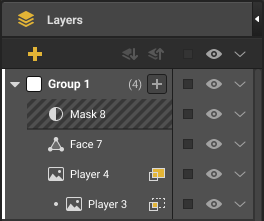
This panel contains many options that will help you manage and arrange all your shapes. Some of them are accessible from both the work area and this panel.
The icons in this panel are presented in the Interface chapter.
Was this article helpful?
That’s Great!
Thank you for your feedback
Sorry! We couldn't be helpful
Thank you for your feedback
Feedback sent
We appreciate your effort and will try to fix the article