The User page allows you to monitor playback status, select an audio source with advanced options and configure access to the user account.
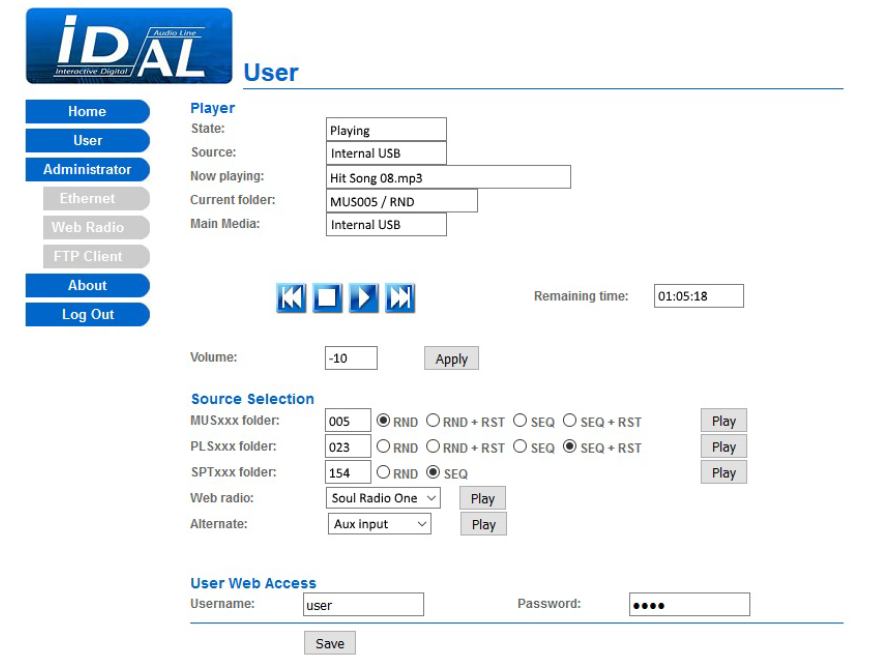
Player
| State | Playback status (Playing or Stopped). |
|---|---|
| Source | The source currently in use by the player:
|
| Now Playing | The audio file or web radio currently playing. |
| Current folder | The logical name of the folder currently playing from the Main Media and its playback mode. |
| Main Media | The port used by the main storage device (My Music Player only): Internal USB, External USB, SD card, Internal HDD. |
Playback controls
| ◄◄ | Plays the previous track or web radio. |
|---|---|
| ■ | Stops playback. |
| ► | Resumes playback. |
| ►► | Plays the next track or web radio. |
| Remaining time | The remaining time of the audio file currently playing. |
| Elapsed time | The elapsed time since connecting to a web radio. |
| Volume | Sets the main volume attenuation level from 0 to -64, or MUTE. |
| Apply | Applies the main volume setting. |
Source Selection
MUSxxx folder
| MUSxxx folder | Selects a folder number from 1 to 999 (MUS001 to MUS999). |
|---|---|
| RND | Selects random playback. |
| RND + RST | Selects random playback with playback history reset. |
| SEQ | Selects sequential playback. |
| SEQ + RST | Selects sequential playback with playback history reset. |
| Play | Plays a MUSIC folder according to the selected options. |
PLSxxx folder
| PLSxxx folder | Selects a folder number from 1 to 999 (PLS001 to PLS999). |
|---|---|
| RND | Selects random playback. |
| RND + RST | Selects random playback with playback history reset. |
| SEQ | Selects sequential playback. |
| SEQ + RST | Selects sequential playback with playback history reset. |
| Play | Plays a PLAYLIST folder according to the selected options. |
SPTxxx folder
| SPTxxx folder | Selects a folder number from 1 to 999 (SPT001 to SPT999). |
|---|---|
| RND | Selects random playback. |
| SEQ | Selects sequential playback. |
| Play | Plays a SPOT folder according to the selected options. |
Web radio
| Webradio | Selects a web radio number from 1 to 10. |
|---|---|
| Play | Plays a web radio according to the selected number. |
Alternate Media
| Alternate | Selects an alternate storage device (Internal USB, External USB, SD card, Internal HDD) or the auxiliary audio input (Aux input) as the playback source (My Music Player only). |
|---|---|
| Play | Plays an alternate storage device or switches to the auxiliary audio input according to the selection in Alternate (My Music Player only). |
User Web Access
| Username | Sets the username for the user account (default: user). |
|---|---|
| Password | Sets the password for the user account (default: user). |
| Save | Applies and saves the user account settings. |
Was this article helpful?
That’s Great!
Thank you for your feedback
Sorry! We couldn't be helpful
Thank you for your feedback
Feedback sent
We appreciate your effort and will try to fix the article