Folder Organization
Only one level of folders is allowed from the root. Folder names must follow these rules:
- Format: 3 digits (000 to 999) followed by optional parameters and a custom name.
- Avoid special or accented characters.
- The first 3 digits define the folder number and its main identifier.
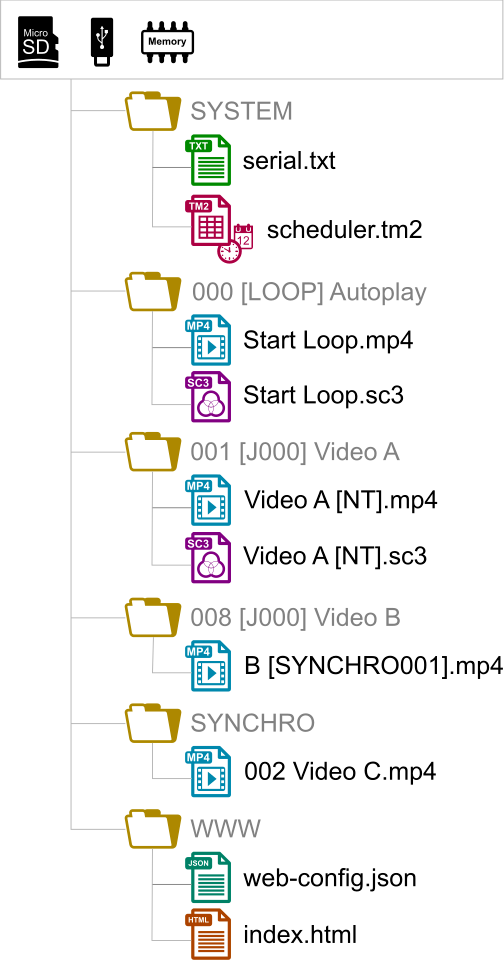
Folder Examples:
000: Folder No. 000 "Autoplay" (played automatically on power-up)
001: Folder No. 1 triggerable by external input contact 1
034: Folder No. 34
The folder numbers (from 000 to 999) allow you to:
- Define the folder played on power-up,
- Perform jumps or direct/time-triggered actions.
The 8 input contacts allow triggering folders 001 to 255 according to a binary code. It is possible to reassign these codes via the configuration panel (remote control or admin console).
Here is the binary correspondence table between folder numbers and inputs:
| Folder No. | Input No. | |||||||
| 1 | 2 | 3 | 4 | 5 | 6 | 7 | 8 | |
| Corresponding Binary Value | ||||||||
| 1 | 2 | 4 | 8 | 16 | 32 | 64 | 128 | |
| 001 | x | |||||||
| 002 | x | |||||||
| 003 | x | x | ||||||
| 004 | x | |||||||
| 005 | x | x | ||||||
| 006 | x | x | ||||||
| 007 | x | x | x | |||||
| 008 | x | |||||||
| 255 | x | x | x | x | x | x | x | x |
Note: Folder 000 is the folder played by default on power-up, if present. When the player is turned on, it checks for this folder. If this folder is absent, the player goes into STOP state.
Note: The default folder read on power-up can be modified in the configuration menu.
File Organization Within Folders
Like folders, the name of files has a direct influence on the playback of video, image, or audio files.
File naming is free if playback is random (option "[RND]" or no option in the folder name).
In sequential playback, files are played in ascending order, taking case into account. To ensure the playback order, you can, for example, prefix your file names with a 3-digit number. Playback options (tags) can be added as needed, such as command locking or temporary volume modification.
Examples:
001 [J367] my message.mkv
063 [RS020] filename.wav
845 [V+12] my file.mp3 my song [NT].wav
Was this article helpful?
That’s Great!
Thank you for your feedback
Sorry! We couldn't be helpful
Thank you for your feedback
Feedback sent
We appreciate your effort and will try to fix the article