Preamble
The names of folders and files define the playback rules. They must be named and organized according to a specific arrangement, detailed in the following chapters. This functionality applies to audio, video, and image files.
Playback on Power-Up
To configure automatic playback:
- Create a folder named 000 on your removable storage.
- Copy one or more media files (videos, photos, audio files) into it.
- Insert the storage into the player and power it on.
The content of the 000 folder is played by default on power-up. It is then played randomly. If it is absent, the player goes into stop mode.
Options:
- For loop playback, add the
[LOOP]tag to the folder name. - For sequential playback, number each media file and add the
[SEQ]tag.
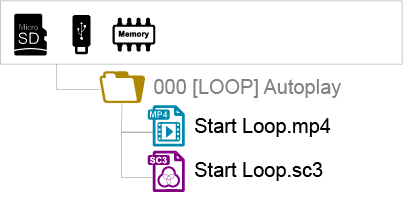
Note: The LOST.DIR and SYSTEM folders as well as the .nomedia file are added to the storage by the player during the first playback to ensure proper operation. Your media should not be added to these folders.
Using Trigger Inputs
Trigger inputs allow you to play folders associated with the number of the activated input.
The EVP380 has:
- 1 separate input (configurable, triggers folder 001 by default),
- 8 additional inputs, allowing you to trigger the first 255 folders (from 001 to 255) according to a binary order.
Folder No. 001 is triggered by the separate input or by input 1 of the group of 8 inputs. The 8 input contacts allow triggering folder numbers corresponding to the 3 digits of the folder number following a binary order from 001 to 255.
- Input 1: Folder 001
- Input 2: Folder 002
- Input 3: Folder 004
- Input 4: Folder 008
- Input 5: Folder 016
- Input 6: Folder 032
- Input 7: Folder 064
- Input 8: Folder 128
Simultaneously pressing multiple input contacts offers up to 255 different combinations. Numbers 001 to 255 correspond to combinations of the 8 input contacts.
Example for triggering folders from the block of 8 inputs:
001: activation of input No. 1
002: activation of input No. 2
003: activation of inputs No. 1 + No. 2
004: activation of input No. 3
005: activation of inputs No. 3 + No. 1
006: activation of inputs No. 3 + No. 2
007: activation of inputs No. 3 + No. 2 + No. 1
008: activation of input No. 4
009: activation of inputs No. 4 + No. 1
and so on following a binary progression.
Identifying the Player on the Network
To identify the player's IP address:
- Use the remote control: Menu → System Settings → Network.
- Or press OK or Info: the IP address is displayed at the bottom right of the screen. The QR code allows you to access the admin interface from a smartphone connected to the same network.
Was this article helpful?
That’s Great!
Thank you for your feedback
Sorry! We couldn't be helpful
Thank you for your feedback
Feedback sent
We appreciate your effort and will try to fix the article