Folder and file names define the playback mode. Folders and files must be named and copied according to a specific arrangement described in the following chapters.
Compatible files:
- .MP3: Audio files in MP3 format (see Appendix B)
- .WAV: Audio files in WAV format (see Appendix B)
TABLE DES MATIÈRES
- Folder Organization
- Folder Number and Name
- Additional Parameters and Optional Tags
- [Jxxx] - Designates the folder number to play at the end of the current folder playback
- [RET] - Return to the previously played folder after the current folder playback
- [SEQ] or [RND] - Define the playback mode of the current folder
- [RLxy] - Activate or deactivate the 2 output contacts
- [V+xx] or [V-xx] - Modify the folder volume
- [NT] - Define the interruption mode of the current folder during playback
- [RSxxx] - Send bytes via the RS-232 output
- [RSxxx] - xxx designates the line number in the serial.txt file to be sent
- [RS002] -> Line #002 - The [RS002] tag will send the byte sequence from line #002 of the serial.txt file
- [WHL] - Play the folder as long as the corresponding input is triggered
- [NXTxxx] - Play a defined number of audio files from the folder
- Specific Behaviors
- File Organization Within Folders
- File Number and Name
- Optional Parameters
- [Jxxx] - Designate the folder number to use at the end of the current file playback
- [RLxy] - Activate or deactivate the 2 output contacts
- [NT] - Define the interruption mode of the current file during playback
- [RSxxx] - Send bytes via the RS-232 output
- [V+xx] or [V-xx] - Temporarily modify the player volume
Folder Organization
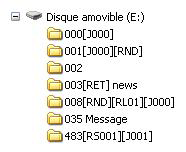 Only one folder level is allowed from the root.
Names consist of 3 digits from 000 to 999, followed by optional parameters and your chosen name.
You must not use special characters or accented letters.
Example:
- 001
- 003 [J002]
- 034 folder name
- 247 [V+02][SEQ] my folder
Folder Number and Name
The first 3 digits define the folder number and thus its main name. Folders are numbered from 000 to 999.
Example:
- 000: Folder No. 000 - "Autoplay" folder played at power-up.
- 001: Folder No. 1
- 034: Folder No. 34
The folder number designates the folder to use when powering on the player, during a jump, or when triggered. You can use any number between 000 and 999.
IMPORTANT: The 4 input contacts can trigger folder numbers corresponding to these first 3 digits in a binary order from 001 to 015. It is possible to modify the triggered folder numbers by editing the config.txt file. (See Configuration File)
- Folder 001 -> Input 1
- Folder 002 -> Input 2
- Folder 003 -> Input 1 + 2
- Folder 004 -> Input 3
- Folder 005 -> Input 1 + 3
- Folder 006 -> Input 2 + 3
- Folder 007 -> Input 1 + 2 + 3
- Folder 008 -> Input 4
- Folder 009 -> Input 1 + 4
- Folder 010 -> Input 2 + 4
- Folder 011 -> Input 1 + 2 + 4
- Folder 012 -> Input 3 + 4
- Folder 013 -> Input 1 + 3 + 4
- Folder 014 -> Input 2 + 3 + 4
- Folder 015 -> Input 1 + 2 + 3 + 4
Special Case
Folder 000 represents the folder that will be played by default at power-up. When the player is turned on, it checks for the presence of this folder. If this folder is present, the player plays its contents. If this folder is absent, the player enters a stop state.
Note: The default folder played at power-up can be modified in the configuration file.
Additional Parameters and Optional Tags
To modify the player's behavior, you can add parameters in the folder name. These parameters are enclosed in square brackets [ ].
You can use multiple parameters in the folder name:
- [Jxxx] - Jump to another folder at the end of the current folder's playback or loop playback.
- [RET] - Return to the previously played folder at the end of the current folder's playback.
- [RND] or [SEQ] - Define random or sequential playback mode for the current folder.
- [RLxy] - Activate the different output contacts.
- [V+xx] or [V-xx] - Temporarily modify the player volume.
- [NT] or [DT] - Define interruption modes.
- [RSxxx] - Send RS-232 codes.
- [WHL] - Play the folder as long as the corresponding input is triggered.
- [NXTxxx] - Play a defined number of audio files from those present in the folder.
Note: Without options, the player reads the current folder in full and randomly, then stops. The folder is interruptible.
[Jxxx] - Designates the folder number to play at the end of the current folder playback
By adding this parameter to the folder name, you define the player's behavior at the end of the current folder's playback, for example, to play another folder. This option can also be used to loop a folder. The xxx parameter in the [Jxxx] tag represents the folder number to play. It is always written with 3 digits (e.g., 001, 045, 999). It ranges from 000 to 999.
To loop files at power-up, use folder 000 with the [J000] tag.
Example:
- 001 [J002]: Jump to folder 002 at the end of folder 001's playback.
- 003 [J003]: Jump to folder 003 at the end of folder 003's playback -> Creates a loop of folder 003.
- 008 [J023]: Jump to folder 023 at the end of folder 008's playback.
- 458 [J999]: Jump to folder 999 at the end of folder 458's playback.
If the destination folder does not exist, playback stops.
If the destination folder contains no files and the name includes an optional tag, this option will be executed. If no playback option is specified, the player enters stop mode.
[RET] - Return to the previously played folder after the current folder playback
You are currently playing a folder. A command arrives to play another folder that has the [RET] tag. The player then jumps to the new folder, plays its contents, and when all files are played, the player resumes playback of the previous folder. You can use this function to play the same message at the end of each folder's playback.
Multiple different folders can designate the same folder to return to the folder that called it.
Example:
- 001 [J100]: Play folder 001, then jump to folder 100.
- 002 [J100]: Play folder 002, then jump to folder 100.
- 100 [RET]: Play the contents of folder 100, then return to the previous folder (001 or 002).
In the example above, at the end of folders 001 and 002, a jump is made to folder 100 to play its contents. At the end of folder 100's playback, the player resumes playback of the previous folder, i.e., the one that last called it.
Note: The [RET] tag only includes a single return level; it is always the previously played folder that serves as the return folder.
[SEQ] or [RND] - Define the playback mode of the current folder
By default, without parameters, the folder is played randomly.
[SEQ]: Playback in numerical order.
[RND] or no parameter: Playback in random order.
Example:
- 001[SEQ]: Play folder 001 in sequential numerical order, then stop at the end of the folder.
- 002[RND][J002]: Play folder 002 in a loop and randomly.
- 003[J001]: Play folder 003 randomly, then jump to folder 001.
By choosing [SEQ], you select the playback mode in a defined order. Sorting is done in numerical order, i.e., according to the digits in the file names. Files in the folder can be numbered from 001 to 999.
In the defined order [SEQ], unnumbered files are ignored.
Folders that do not comply with the naming rules are ignored.
[RLxy] - Activate or deactivate the 2 output contacts
Each folder can directly control the different output contacts without any additional programming. You can turn on lights, activate motors, or perform any other actions based on the folder being played.
[RLxy]: x and y represent the 2 outputs (x=output 1, y=output 2) and can take 3 values:
- x or y = 0: The output(s) are deactivated.
- x or y = 1: The output(s) are activated during the playback of the current folder.
- x or y = 2: The output(s) are permanently activated. Another command is required to deactivate them.
Output contacts are switched at the start of the folder's playback. If files in the folder have an option to activate or deactivate output contacts, the different outputs will change accordingly.
Note: If a folder is played in a loop, outputs with state set to 1 will be re-triggered at each loop of the folder. This implies a micro-interruption of the output designated as 1 each time the folder loops.
Example:
- 000[RL00][J000]: Play folder 000 in a loop at power-up. The outputs are deactivated.
- 001[RL10][J000]: Activate output 1 during folder 001's playback, then return to folder 000, deactivating output 1 at the end of folder 001's playback.
- 002[RL02][J003]: Permanently activate output 2 during folder 002's playback, then jump to folder 003 without deactivating output 2.
- 003[J003]: Play folder 003 in a loop. Output 2 may be activated due to the jump from folder 002.
[V+xx] or [V-xx] - Modify the folder volume
The folder name can affect the output volume. This function is used to play messages louder or quieter than other files. The volume increase or decrease via volume tags is always relative to the general volume setting.
The xx parameter in the [V+xx] and [V-xx] tags represents the number of steps needed to increase or decrease the main volume. It is always written with 2 digits (e.g., 01, 32, 64). It ranges from 00 to 64.
Example:
- 001 [V+05]: Increase volume by 5 steps during the folder's playback.
- 002 [V-03]: Decrease volume by 3 steps during the folder's playback.
At the end of the folder's playback, the volume returns to the previous level. If the change values exceed the player's maximum or minimum volume levels, the levels are set to their maximum or minimum.
[NT] - Define the interruption mode of the current folder during playback
If this option is included in the folder name, the files being played cannot be interrupted, and received commands are ignored.
Without this option, the current folder's playback can be interrupted at any time by an external action (input contact, RS-232, etc.).
Example:
001 [NT]: Folder 001 is NON-interruptible.
An action on one of the input contacts, via RS-232, or otherwise, is ignored, and the current folder's playback is not stopped. Note: The action is not memorized, and the trigger information is lost.
[RSxxx] - Send bytes via the RS-232 output
When the folder is called, a list of bytes is sent via the serial connection to control other devices (another player, a switching grid, a video projector, etc.). The bytes to be sent are contained in a text file created for this purpose.
Default value: 19200 Baud - 8 bits - No parity - 1 start bit - 1 stop bit
(The baud rate can be modified via the config.txt file)
The xxx parameter in the [RSxxx] tag represents the serial command number to send via the player's RS-232 (line number in the serial.txt file). It is always written with 3 digits (e.g., 001, 045, 999). It ranges from 001 to 999.
[RSxxx] - xxx designates the line number in the serial.txt file to be sent
The file defining the bytes to be sent must be named: serial.txt
It will be copied to the root of the media (SD/SDHC card - USB drive)
This file is a plain text file (without formatting) that can be created with any simple text editor such as Windows Notepad or similar. When saving, use ANSI encoding.
Do not use special characters.
The serial.txt file for RS-232 codes is a text file containing one or more lines. Each line will contain a sequence of bytes expressed in hexadecimal and separated by a space (from 00h to FFh). You should only note the two characters of the desired hexadecimal value.
Each line in this file must start with the following parameter:
#xxx: xxx is the line number containing the bytes to send, corresponding to the xxx in the tag.
[RS002] -> Line #002 - The [RS002] tag will send the byte sequence from line #002 of the serial.txt file
The separator between each byte is a space.
Example of lines in the serial.txt file:
- #001:45 85 63 21 78 A5 B2
- #002:98 75 21 35 45 98
- #100:21 35 45 78 A5 B2
It is also possible to add comments in the file by using the character "//" (forward slash).
// Example file
#001:05 A1 FF E4 // comment in the line
#005:45 85 63 21 78 A5 B2
#100:98 75 35 45 98 // my command
// Another command
#064:48 25 Ce 8b
#128:4C 8E D9 5A //
#999:a4 Fc 48 3e 8B
// Comments at the end of the file
Example to trigger playback of folder 001 from another MicroPlayer mkIII:
- #001:80 01 01
File examples:
- 001[RS001].mp3: Send the bytes from line #001 of the serial.txt file when playing file 001.
- 002[RS064].wav: Send the bytes from line #064 of the serial.txt file when playing file 002.
Note: If a folder is played in a loop, the message xxx defined by the [RSxxx] tag will be sent each time the folder loops.
Example:
- 001[J001][RS099]: Play folder 001 in a loop. Each time the folder loops, the message defined in line 099 of the serial.txt file will be sent via the player's RS-232.
[WHL] - Play the folder as long as the corresponding input is triggered
This parameter allows the folder's contents to be played as long as the input corresponding to this folder is activated. When the input associated with the folder is deactivated, the player applies the tags related to the folder's exit. As long as the input corresponding to the folder is activated, the folder is played in a loop.
Example:
- 001[WHL]: Folder 001 is played in a loop as long as input 1 is activated. When input 1 is deactivated, the player STOPS.
- 002[WHL][J045]: Folder 002 is played in a loop as long as input 2 is activated. When input 2 is deactivated, the player plays folder 045.
- 003[WHL][J999]: Folder 003 is played in a loop as long as inputs 1+2 are activated. When inputs 1+2 are deactivated, the player plays folder 999.
The player's dry contact inputs are combinatorial, meaning that any change in the combination of activated inputs will be taken into account at any time by the player.
Example:
- 000[J000]: Folder 000 is played in a loop at power-up.
- 001[WHL][J000]: Folder 001 is played in a loop as long as input 1 is activated. If input 2 is activated in addition to input 1, the player plays folder 003.
- 002[WHL][J000]: Folder 002 is played in a loop as long as input 2 is activated. If input 1 is activated in addition to input 2, the player plays folder 003.
- 003[WHL][J000]: Folder 003 is played in a loop as long as inputs 1+2 are activated. If input 1 is deactivated, the player plays folder 002. If input 2 is deactivated, the player plays folder 001.
[NXTxxx] - Play a defined number of audio files from the folder
This parameter allows a determined number of audio files to be played from those present in the folder. When the number of audio files played in the folder has been reached, the player applies the tags related to the folder's exit. If the number of files requested by the [NXTxxx] tag exceeds the number of audio files present in the folder, the player will loop within the folder as many times as necessary to play the exact number of requested audio files.
With this tag, the player memorizes the audio files that are played. This means that audio files already played by a previous [NXTxxx] command will not be replayed until all files in the folder have been played.
The xxx parameter in the [NXTxxx] tag represents the number of files to play in the designated folder. It is always written with 3 digits (e.g., 001, 045, 999). It ranges from 001 to 999.
Example:
- 001[NXT003]: Play 3 audio files randomly in folder 001, then the player STOPS.
- 002[NXT001][J000]: Play 1 audio file in folder 002, then the player plays folder 000.
- 003[NXT005][RET]: Play 5 audio files in folder 003, then the player returns to the previously played folder.
- 004[NXT002][SEQ][J000]: Play the next 2 files in numerical order (see SEQ function) in folder 004, then the player plays folder 000.
Specific Behaviors
If a folder is absent but an action designates it, playback stops.
When triggering a folder that contains no files and the name includes an optional tag, this option will be executed. If no playback option (e.g., a jump) is specified, the player enters stop mode.
File Organization Within Folders
As with folders, file names directly influence the playback of audio files.
Note: File naming is free if playback is random (option [RND] or no option in the folder name). In this case, all files will be played, and all will be interruptible.
For playback in a defined order (sequential), you must number the files. Names consist of 3 digits from 001 to 999 and a name of your choice. Optional information (tags) can be added according to your needs, such as the file's interruptibility or output triggering.
Example:
- 001 [J367] my message.mp3
- 063 [RS020] file name.wav
- 845 [V+12][RL01] my file.mp3
- my song [NT].wav
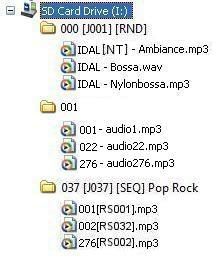
Two types of audio files can be used:
- Files in WAV format (.wav).
- Files in MPEG Layer 3 format (.mp3).
Note: In sequential playback mode (SEQ), if you mix numbered and unnumbered files, only the numbered files will be played. In random mode, all will be played.
File Number and Name
The first 3 digits define the file number and thus its main name, from 001 to 999.
Example:
- 001.mp3: File No. 001
- 063.wav: File No. 063
If the folder specifies random mode, files do not need to be numbered, and playback is random. In sequential mode [SEQ], files are played in the numerical order of the first three digits. If the folder specifies the defined order [SEQ], unnumbered files are ignored.
Optional Parameters
To modify the player's behavior, you can add optional parameters in the file name. These parameters are enclosed in square brackets [ ]. You can use multiple parameters in the file name.
- [Jxxx] - Jump to a folder at the end of the current file's playback.
- [NT] or [DT] - The file is non-interruptible, or the action is memorized to be executed at the end of the file.
- [RLxy] - Activate or deactivate the different output contacts.
- [RSxxx] - Send a list of bytes via the RS-232 serial connection.
- [V+xx] or [V-xx] - Temporarily modify the player volume.
Note: Without options, files are played one after another according to the selected mode (random or sequential) and can be interrupted at any time by an external action.
[Jxxx] - Designate the folder number to use at the end of the current file playback
By adding this parameter to the file name, you define the player's behavior at the end of the current file's playback, for example, to play another folder.
If the destination folder does not exist, playback stops.
If the destination folder contains no files and the name includes an optional tag, this option will be executed. If no playback option is specified, the player enters stop mode.
This function, for example, allows you to monitor a file so that it is followed by a jump action.
Multiple different files can designate the same jump folder.
Example:
- my file [J002].mp3 - Jump to folder 002 at the end of the file's playback.
- 003[J023][RL02].mp3 - Activate output 2 and jump to folder 023 at the end of the file's playback.
- 034[J034].wav - Jump to folder 034 at the end of the file's playback. This is not a loop with file 034 but a jump to folder 034.
[RLxy] - Activate or deactivate the 2 output contacts
Each file can directly control the different output contacts without any additional programming. You can turn on lights, activate motors, or perform any other actions based on the file being played.
[RLxy]: x and y represent the 2 outputs (x=output 1, y=output 2) and can take 3 values:
- x or y = 0: The output(s) are deactivated.
- x or y = 1: The output(s) are activated during the file's playback.
- x or y = 2: The output(s) are permanently activated. Another command is required to deactivate them.
Output contacts are switched at the start of the file's playback and deactivated at the end of the file.
[NT] - Define the interruption mode of the current file during playback
If this option is included in the file name, the file cannot be interrupted, and received commands are ignored.
Without this option, the current file's playback can be interrupted at any time by an external action, unless the option is included in the folder name.
Example:
- message [NT].mp3 - The file is NON-interruptible.
An action on one of the input contacts, via RS-232, or otherwise, is ignored, and the current file's playback is not stopped. Note: The action is not memorized, and the trigger information is lost.
You can mix interruptible and non-interruptible files in the same folder.
Note: The [NT] tag only affects folder change commands. PLAY, STOP, NEXT FILE, or PREVIOUS FILE commands are executed immediately.
[RSxxx] - Send bytes via the RS-232 output
When the file is called, a list of bytes is sent via the serial connection to control other devices (another player, a switching grid, a video projector, etc.). The bytes to be sent are contained in a text file created for this purpose.
Default value: 19200 Baud - 8 bits - No parity - 1 start bit - 1 stop bit
(The baud rate can be modified via the config.txt file)
The xxx parameter in the [RSxxx] tag represents the serial command number to send via the player's RS-232 (line number in the serial.txt file). It is always written with 3 digits (e.g., 001, 045, 999). It ranges from 001 to 999.
[V+xx] or [V-xx] - Temporarily modify the player volume
The file name can affect the output volume. This function is used to play messages louder or quieter than other files.
Example:
- 001[V+05].mp3: Increase volume by 5 steps during the file's playback.
- 001[V-03].wav: Decrease volume by 3 steps during the file's playback.
The volume increase or decrease via volume tags is always relative to the general volume setting.
The xx parameter in the [V+xx] and [V-xx] tags represents the number of steps needed to increase or decrease the main volume. It is always written with 2 digits (e.g., 01, 32, 64). It ranges from 00 to 64.
At the end of the file's playback, the volume returns to the previous level.
If the change values exceed the player's maximum or minimum volume levels, the levels are set to their maximum or minimum.
Was this article helpful?
That’s Great!
Thank you for your feedback
Sorry! We couldn't be helpful
Thank you for your feedback
Feedback sent
We appreciate your effort and will try to fix the article