The Administrator page allows you to configure various player settings, including the clock, Main Media type, playback at startup, fades, volumes and gains, and administrator account access.
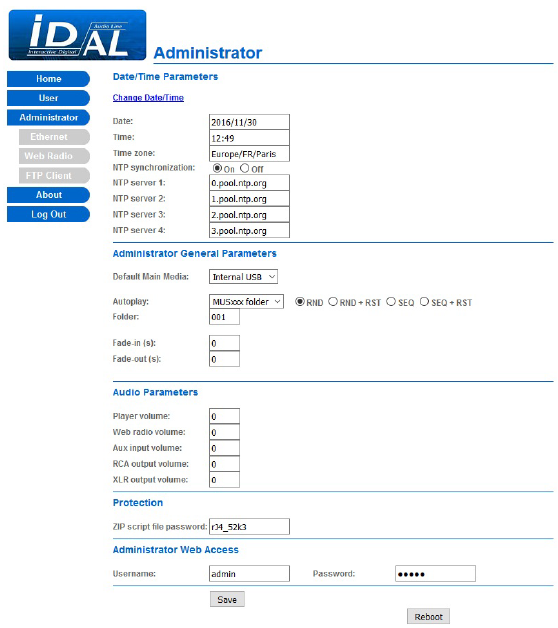
Date/Time Parametres
| Change Date/Time | Changes the player’s date, time and time zone. |
|---|---|
| Date | The player’s current date. |
| Time | The player’s current time. |
| Time zone | The player’s time zone. |
| NTP Synchronization | Enables or disables clock synchronization via NTP. On = NTP enabled / Off = NTP disabled. |
| NTP server 1 | Sets the URL of the first NTP server (default: 0.pool.ntp.org). |
| NTP server 2 | Sets the URL of the second NTP server (default: 1.pool.ntp.org). |
| NTP server 3 | Sets the URL of the third NTP server (default: 2.pool.ntp.org). |
| NTP server 4 | Sets the URL of the fourth NTP server (default: 3.pool.ntp.org). |
Administrator General Parameters
| Default Main Media | Sets the port used by the Main Media: Internal USB, External USB, SD card, Internal HDD (My Music Player only). |
|---|---|
| Autoplay | Sets a specific playback source at player startup: None, MUSxxx folder, PLSxxx folder, Web radio, Last or Scheduler (or Aux input for My Music Player only). Default: NONE. |
| RND | Sets random playback when the MUSxxx folder or PLSxxx folder Autoplay mode is selected. |
| RND + RST | Sets random playback with playback history reset when the MUSxxx folder or PLSxxx folder Autoplay mode is selected. |
| SEQ | Sets sequential playback when the MUSxxx folder or PLSxxx folder Autoplay mode is selected. |
| SEQ + RST | Sets sequential playback with playback history reset when the MUSxxx folder or PLSxxx folder Autoplay mode is selected. |
| Folder | Sets the folder number from 1 to 999 (MUS001 / PLS001 to MUS999 / PLS999) when the MUSxxx folder or PLSxxx folder Autoplay mode is selected. |
| Web radio preset | Sets the web radio number from 1 to 10 when the Web radio Autoplay mode is selected. |
| Fade-in (s) | Sets the fade-in duration from 0 to 5 seconds (default: 0). |
| Fade-out (s) | Sets the fade-out duration from 0 to 5 seconds (default: 0). |
Audio Parameters
| Player volume | Sets the volume attenuation for audio file playback from 0 to -64, or MUTE (default: 0). |
|---|---|
| Web radio volume | Sets the volume attenuation for web radio playback from 0 to -64, or MUTE (default: 0). |
| Auxiliary volume | Sets the volume attenuation for the auxiliary audio input from 0 to -64, or MUTE (default: 0) (My Music Player only). |
| RCA volume | Sets the volume attenuation for the RCA audio outputs from 0 to -64, or MUTE (default: 0). |
| XLR volume | Sets the volume attenuation for the XLR audio outputs from 0 to -64, or MUTE (default: 0) (My Music Player only). |
| Amplified output volume | Sets the volume attenuation for the amplified audio outputs from 0 to -64, or MUTE (My Music Player LE only). |
Protection
| Zip script file password | Sets the password for the compressed ZIP file used by the copy script (default: empty). |
|---|
Administrator Web Access
| Username | Sets the username for the administrator account (default: admin). |
|---|---|
| Password | Sets the password for the administrator account (default: admin). |
| Save | Applies and saves all settings on the Administrator page. |
| Reboot | Forces the player to restart. |
Was this article helpful?
That’s Great!
Thank you for your feedback
Sorry! We couldn't be helpful
Thank you for your feedback
Feedback sent
We appreciate your effort and will try to fix the article