The Web Radio page allows you to configure settings for web radio use.
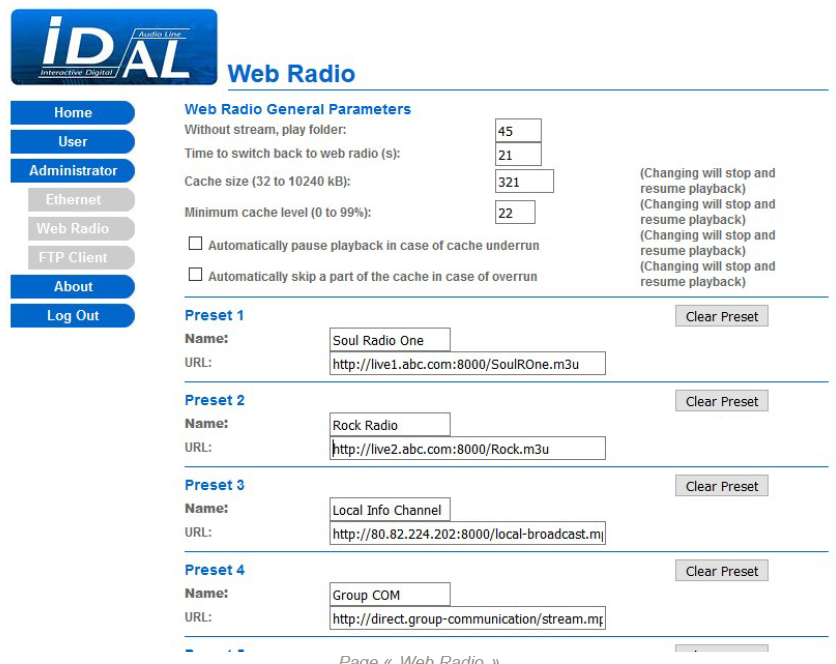
Web Radio General Parameters
| Without stream, play folder | Sets the number of the MUSIC folder played when the web radio stream is lost, from 001 to 999 (default: 001). |
|---|---|
| Time to switch back to the web radio | Sets how long the audio stream must remain stable before web radio playback starts, from 20 to 999 seconds (default: 20). |
| Cache size (32 to 10240 kB) | Sets the total size of the web radio memory cache, from 32 to 10240 kB (default: 320 kB). |
| Minimum cache level (0 to 99%) | Sets the minimum percentage of the memory cache that must be filled before web radio playback resumes, from 0 to 99% (default: 20%). |
| Automatically pause playback in case of cache underrun | Enables or disables pausing web radio playback when its memory cache is empty, instead of switching to playback of a fallback folder (default: disabled). |
| Automatically skip a part of the cache in case of overrun | Enables or disables skipping part of the received web radio stream when its memory cache is overloaded by the web radio server (default: disabled). |
Preset 1 to Preset 10
| Name | Sets an arbitrary name for the web radio. |
|---|---|
| URL | Sets the address (.mp3 or .m3u) of the web radio’s MP3 stream. |
| Clear Preset | Deletes the web radio preset settings. |
The same options are available for all web radio presets.
Save: Applies and saves all settings on the Web Radio page.
Was this article helpful?
That’s Great!
Thank you for your feedback
Sorry! We couldn't be helpful
Thank you for your feedback
Feedback sent
We appreciate your effort and will try to fix the article