When to Use a Behringer Preamplifier
If you decide to use a multimedia player with low output levels, the HyperSound amplifier may not be sufficient to achieve the desired volume from the emitters.
In this case, we recommend using a Behringer preamplifier, which will provide the necessary signal amplification for optimal results.
NOTE: Up to 4 HyperSound amplifiers can be connected to the Behringer HA4000. Connect them to outputs 1 to 4.
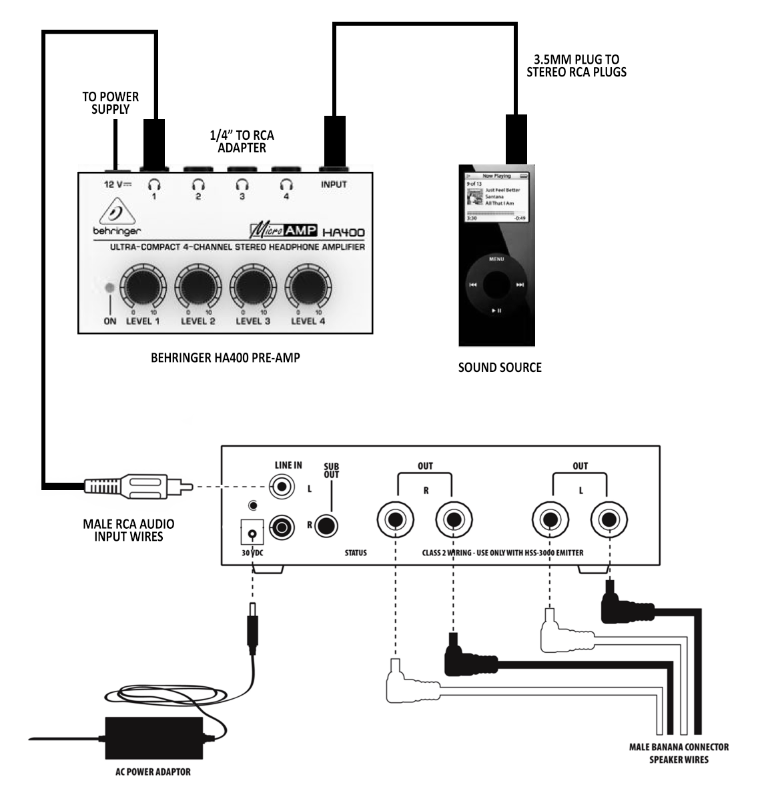
NOTE: Disconnect the equipment before configuring all audio and power connections.
Step 1: Speaker Cable Connections
Connect the cables with red and black banana connectors to the rear of each speaker and the corresponding terminals to the rear of the amplifier, as illustrated.
Step 2: RCA Cable Connections
- Plug the dual female RCA end of this cable into the amplifier. Connect the other end to the Behringer preamplifier.
- Plug a 3.5 mm RCA plug into the preamplifier's input, and the other end to your audio source.
Step 3: Behringer Power Connection
- Plug the Behringer HA400's 12V DC power cord into the 12V DC power supply located at the rear of the Behringer amplifier.
- Plug the Behringer amplifier's power supply into a properly grounded AC outlet.
NOTE: To make adjustments, start with the Behringer HA4000 level at 0 and turn clockwise until the desired output level is reached. If the HyperSound amplifier's status light flashes, you are overloading the input and must reduce the input level until the light is steady.
Was this article helpful?
That’s Great!
Thank you for your feedback
Sorry! We couldn't be helpful
Thank you for your feedback
Feedback sent
We appreciate your effort and will try to fix the article