Reflective Surfaces
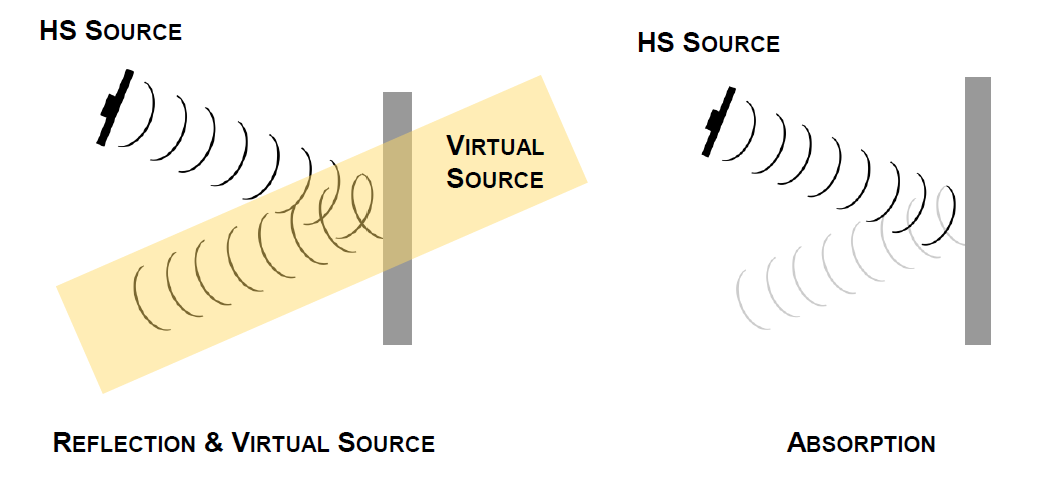
Although HyperSound's audio beam is very narrow, it still reflects off surfaces. Just as a mirror reflects the light from a flashlight, HyperSound will reflect audio in a similar manner. It is important to understand that sound reflects off all hard surfaces and will behave differently when it encounters other types of surfaces.
Tips:
- To avoid unwanted reflections, which broadcast sound to undesired areas, it is recommended not to set the volume level higher than necessary.
- If you have wooden or vinyl floors, try placing a rug to help absorb some of these harmful reflections.
Using Surfaces for Projection
One of HyperSound's unique features is that it can use reflective surfaces to act as a virtual audio source. If the listener is not in the sound beam (standing to the side or behind the HyperSound speaker) and the beam hits a hard surface, the sound will be reflected into the environment.
By directing the sound beam against a reflective surface (such as a wall or table), an audible sound is created at the point of impact, which can produce a powerful virtual speaker effect. It is also important to note that the beam will reflect with very similar directivity, so it is necessary to ensure that the beam remains in the intended listening area.
NOTE: Anywhere you see your speaker reflected in the mirror is a reflection point that should receive absorbing acoustic treatment, or in some cases, diffusing. Applying absorbing material to walls and other reflective surfaces is the primary method to mitigate unwanted reflections.
Was this article helpful?
That’s Great!
Thank you for your feedback
Sorry! We couldn't be helpful
Thank you for your feedback
Feedback sent
We appreciate your effort and will try to fix the article