The VP320 and VP330 media players by Waves System are designed for intuitive and flexible use. Folder and file names define the playback rules, and their specific arrangement allows precise control over the player's behavior. This guide walks you through the essential first steps to fully utilize the basic features of your device, whether for video, audio, or image files.
Auto-Play on Power-Up
When powered on, your VP320 or VP330 player automatically checks for a folder named 000 on your removable storage device (USB, SD, etc.).
How the 000 Folder Works
- Create the folder: Create a folder named
000on your removable storage. - Add media files: Copy one or more files (videos, photos, audio files) into it.
- Power up: Insert the storage into the player and turn it on.
- If the
000folder is present, the player will randomly play its contents. - If the
000folder is missing, the player will enter stop mode.
- If the
Using Tags for Playback Control
To customize playback for the 000 folder, you can use the following tags:
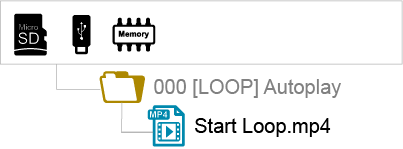
[LOOP]: Add this tag to the folder name to loop continuously through its contents.
Example:000 [LOOP][SEQ]: Add this tag for sequential playback of media files. In this case, number each file (e.g.,001.mp4,002.mp4, etc.) to define the playback order.
Example:000 [SEQ]with files001.mp4,002.mp4,003.mp4
⚠️ Important Note: TheLOST.DIRandSYSTEMfolders, as well as the.nomediafile, are automatically generated by the player during the first playback. Do not place your media in these folders, as they will not be played.
Using Trigger Inputs
Trigger inputs allow you to start playback of specific folders based on the activated input. This feature is particularly useful for interactive installations or those triggered by external sensors.
For the VP320
- The VP320 has 1 separate trigger input.
- This input is configurable in the menu and defaults to triggering folder
001. - You can reassign this input to another folder or command via the configuration panel (accessible via remote control or admin console).
For the VP330
- The VP330 has 1 separate input + 8 additional inputs (group of 8).
- Separate input: Defaults to triggering folder
001(configurable). - 8 group inputs: Allow triggering folders 001 to 255, based on a binary code formed by the state of all inputs.
How the 8 Inputs Work on the VP330
The 8 inputs can trigger 255 different combinations depending on their simultaneous activation.
Here’s how it works:
| Activated Input | Triggered Folder |
|---|---|
| Input 1 | Folder 001 |
| Input 2 | Folder 002 |
| Input 3 | Folder 004 |
| Input 4 | Folder 008 |
| Input 5 | Folder 016 |
| Input 6 | Folder 032 |
| Input 7 | Folder 064 |
| Input 8 | Folder 128 |
Combination Examples:
- Activate Input 1 → Folder 001
- Activate Inputs 1 + 2 → Folder 003 (1+2 in binary)
- Activate Inputs 3 + 2 + 1 → Folder 007 (4+2+1 in binary)
- Activate Input 4 → Folder 008
- Activate Inputs 4 + 1 → Folder 009 (8+1 in binary)
? Tip: You can reassign input codes to other folders or commands via the configuration menu.
Identifying the Player on the Network
To identify your player on a local network, you have two simple methods:
Method 1: Using the Remote Control
- Select Menu > System Settings > Network.
- The player’s IP address will display on the screen.
Method 2: Using the Player Screen
- Press OK or Info.
- The IP address will appear at the bottom right of the screen.
- A QR code is also displayed, allowing direct access to the admin interface from a smartphone connected to the same network.
? Note: The IP address is essential for accessing the player’s web interface, controlling it remotely via TCP/IP, or synchronizing multiple players together.
Was this article helpful?
That’s Great!
Thank you for your feedback
Sorry! We couldn't be helpful
Thank you for your feedback
Feedback sent
We appreciate your effort and will try to fix the article