The VP320 and VP330 media players by Waves System allow precise control of playback through a specific organization of folders and files. Folder names define not only their playback order but also their behavior. This guide details how to structure your storage media to fully utilize the basic features of your device.
Folder Organization
Basic Structure (Common to VP320/VP330)
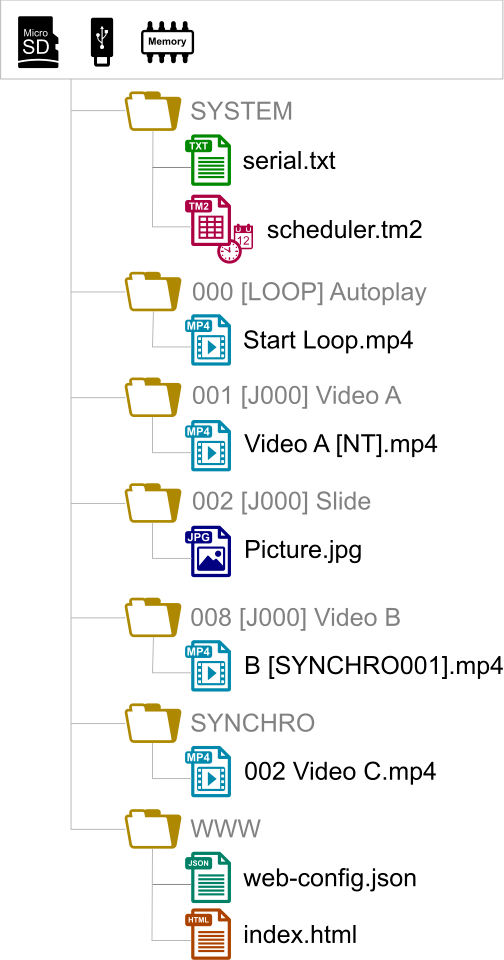
Only one level of folders is allowed from the root of the storage media (USB, SD, etc.).
Folder names must start with 3 digits (from
000to999), followed by optional parameters (tags) and an optional custom name.
Example:001[LOOP] MyFolder
⚠️ Naming Rules:
Use only unaccented alphanumeric characters (no special characters like
é,è,ç,!,@, etc.).The first 3 digits define the folder number and its main identifier.
Numbering and Usage (Common to VP320/VP330)
Folder Number | Default Usage |
|---|---|
| Autoplay folder: Automatically played at power-up if present. |
| Triggered by external contact input 1 (VP320 and VP330). |
| Can be used for manual jumps, scheduled triggers, or custom scenarios. |
? Notes:
The
000folder is prioritized at power-up. If it is missing, the player enters STOP mode.The default folder at power-up can be changed in the configuration menu.
Using Trigger Inputs
Trigger inputs allow you to start playback of specific folders based on the activated input.
For the VP320
1 trigger input (configurable in the menu).
Defaults to triggering folder
001.Can be reassigned to another folder or command via the configuration panel.
? Note: The VP320 has a single physical input but can be used in advanced configurations (e.g., daisy-chain connections).
For the VP330
1 separate input + 8 additional inputs (group of 8).
Separate input: Defaults to triggering folder
001(configurable).8 group inputs: Allow triggering folders 001 to 255, based on a binary code formed by the state of all inputs.
Input-to-Folder Correspondence (VP330 Only)
This table shows the binary combinations for the 8 inputs of the VP330, allowing you to trigger folders 001 to 255:
Folder | 1 | 2 | 3 | 4 | 5 | 6 | 7 | 8 |
|---|---|---|---|---|---|---|---|---|
Input No. | ||||||||
Corresponding Binary Value | ||||||||
1 | 2 | 4 | 8 | 16 | 32 | 64 | 128 | |
001 | x | |||||||
002 | x | |||||||
003 | x | x | ||||||
004 | x | |||||||
005 | x | x | ||||||
006 | x | x | ||||||
007 | x | x | x | |||||
008 | x | |||||||
009 | x | x | ||||||
010 | x | x | ||||||
011 | x | x | x | |||||
012 | x | x | ||||||
013 | x | x | x | |||||
014 | x | x | x | |||||
015 | x | x | x | x | ||||
016 | x | |||||||
017 | x | x | ||||||
031 | x | x | x | x | x | |||
032 | x | |||||||
033 | x | x | ||||||
063 | x | x | x | x | x | x | ||
064 | x | |||||||
065 | x | x | ||||||
127 | x | x | x | x | x | x | x | |
128 | x | |||||||
129 | x | x | ||||||
254 | x | x | x | x | x | x | x | |
255 | x | x | x | x | x | x | x | x |
? Note:
The 255 combinations cover all folders from 001 to 255.
The 8 inputs of the VP330 allow triggering folders based on their binary state (e.g., input 1 + input 2 = folder 003).
File Organization Within Folders
File Naming Rules
In random mode (
[RND]or no tag): File names can be free (no impact on playback order).In sequential mode (
[SEQ]): Files are played in ascending alphanumeric order (e.g.,001.mp4,002.mp4, etc.).
*→ Tip: Prefix your files with 3-digit numbers to ensure the desired order (e.g.,001_video.mp4,002_video.mp4).
Adding Tags to Files
You can also add tags directly to file names to apply specific parameters:
001[J367] my_message.mkv: After playback, jumps to folder367.063[RS020] my_file.wav: Sends RS-232 frame #20 at the end of playback.845[V+12] my_file.mp3: Increases volume by 12% during playback.my_song[NT].wav: Disables interruptions during playback.
? Note:
Missing files are ignored (no error, playback continues).
For supported formats, refer to the chapter Supported Audio/Video File Formats.
Special Folders
SYSTEM Folder (Optional)
Contains advanced configuration files:
scheduler.tm2: Scheduling configuration file.scenario-config.json: Web page indexing.serial.txt: RS-232 frames.web-config.json: Web page configuration.
WWW Folder (Optional)
Hosts web pages that can be displayed locally (without network connection).
Special Cases and Troubleshooting
Folder Without Tags
If a folder has no tags, the player plays it randomly (or sequentially if
[SEQ]is set by default) and stops at the end.
Missing Folder
If a folder does not exist but is called by a tag (e.g.,
[J999]), the action is ignored, and playback continues.
Empty Folder
An empty folder is played instantly (no files to play). Associated tags (e.g.,
[Jxxx],[RET]) are applied normally.
Loop with Tags
If a folder is played in a loop (e.g.,
001[J001]), all tags (start and end) are re-executed on each loop.
→ To avoid this, use[LOOP]instead of[Jxxx].
Was this article helpful?
That’s Great!
Thank you for your feedback
Sorry! We couldn't be helpful
Thank you for your feedback
Feedback sent
We appreciate your effort and will try to fix the article