The EVP380 offers several methods for intuitive control of its features. This section presents the two main direct control methods:
- The front panel interface with its clickable wheel and LCD screen
- The infrared remote control provided with the controller
These interfaces allow quick access to essential information and control of all the controller's main functions.
Front Panel Control
The EVP380 has an intuitive user interface consisting of:
- An LCD screen for displaying information
- A clickable wheel named "Volume / -Menu-"
Default Display:
- Current folder number being played
- Elapsed time
- Name of the file currently playing
Navigation by Clicks:
Each click on the button displays distinctly:
- Model
- Firmware version
- IP address
- MAC address
- Date
- Time
ⓘ The wheel also allows you to:
- Navigate through menus (by turning it)
- Validate selections (by clicking)
- Adjust the volume (in playback mode)
ⓘ The wheel also allows you to:
- Navigate through menus (by turning it)
- Validate selections (by clicking)
- Adjust the volume (in playback mode)
Infrared Remote Control
The EVP380 comes with an infrared remote control for complete remote operation. Here are the details of each key's functions:
| Key | Description | |
|---|---|---|
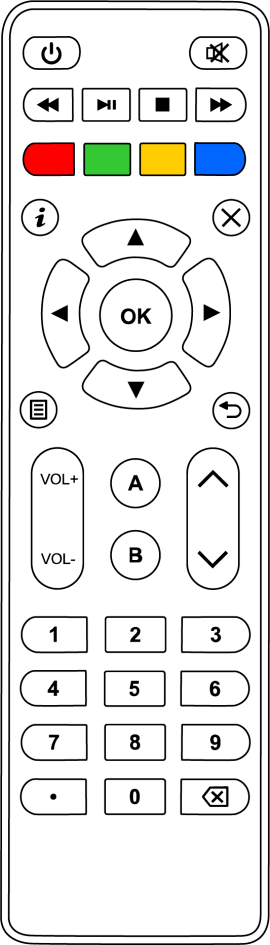 | ⏻ | Short press: Standby / Wake up Long press: Turn off / Restart |
| ? | Mute / Unmute sound | |
| ⏪ ▶️ ⏩ | ⏪ ⏩: Forward/Rewind by 10 seconds ▶️: Play / Pause | |
| ⏹ | Stop playback | |
 | Programmable buttons (see Scenario Settings menu) | |
 | Toggle information display on screen | |
| X | Exit current menu | |
 | In a menu: Navigate up/down In playback: Next/Previous folder | |
 | In a menu: Navigate left/right In playback: Previous/Next file | |
| OK | In a menu: Validate selection In playback: Toggle information display | |
 | Toggle menu display on screen | |
 | Return to previous menu | |
 | Increase/Decrease volume | |
 | Programmable buttons | |
 | Value adjustment. | |
| 0-9 | In a menu: Enter digits In playback: Play folder 0 to 9 | |
| . | Dot character (for input) | |
| ⌫ | Delete previous character |
Was this article helpful?
That’s Great!
Thank you for your feedback
Sorry! We couldn't be helpful
Thank you for your feedback
Feedback sent
We appreciate your effort and will try to fix the article