NOTE: Disconnect the equipment before configuring all audio and power connections.
Step 1: Speaker Cable Connections
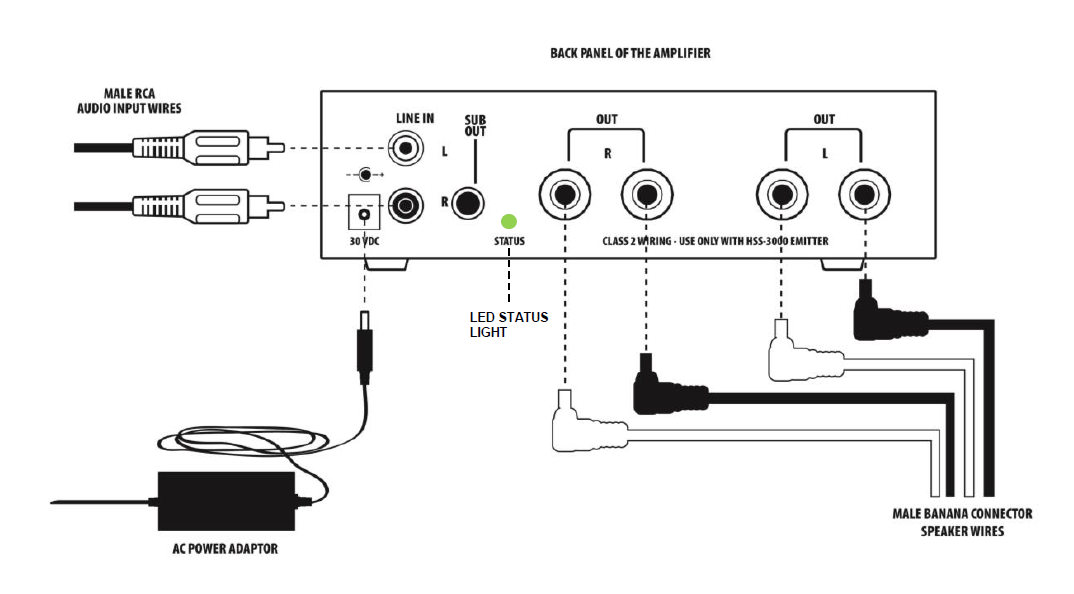
Connect the cables with red and black banana connectors to the rear of each speaker and the corresponding terminals to the rear of the amplifier, as illustrated.
Step 2: RCA Cable Connections
Plug the dual female RCA end of this cable into the amplifier. Connect the other end to your audio source (iPhone, iPad, PC, MP3 player, TV, etc.). The input impedance is approximately 10 kΩ.
NOTE: When applying power to the system, the volume will gradually increase, possibly taking up to 1 minute to reach maximum volume. Wait for this delay to pass before adjusting the amplifier's input level.
Step 3: Amplifier Power Connection
- Plug the amplifier's power cord into the 30V DC power supply located at the rear of the amplifier.
- Plug the amplifier's power supply into a properly grounded AC outlet.
NOTE: The unit does not have a power switch. It will turn on automatically when AC power is established. After connecting to the AC outlet, a small green LED light located next to the DC power jack will turn on, indicating that the unit is powered.
Was this article helpful?
That’s Great!
Thank you for your feedback
Sorry! We couldn't be helpful
Thank you for your feedback
Feedback sent
We appreciate your effort and will try to fix the article