Use the clickable knob on the front panel to select and change Micro AMP 1 settings: press the knob to select a setting, then turn it to change the value. Headphone output volume has a separate knob.
Understand the signal path
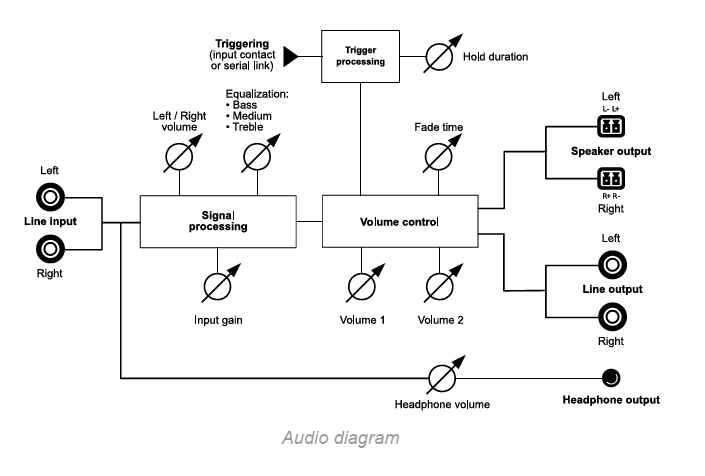
The audio diagram distinguishes the speaker and line-level output path from the headphone output path.
The speaker and line-level outputs pass through signal processing and then volume control. The diagram shows a separate headphone output path with its own volume control.
The controls should therefore not be assumed to affect every output in the same way.
| Setting | Function | Range and increment | Default |
|---|---|---|---|
| Volume 1 | Main volume | −56 to 0 dB, in 1 dB increments | −40 dB |
| Volume 2 | Secondary volume | −56 to 0 dB, in 1 dB increments | −35 dB |
| PAN R/L | Left/right channel balance | −72 to 0 dB, in 1 dB increments | 0 dB on both channels |
| Input Gain | Input gain | 0 to +30 dB, in 2 dB increments | 0 dB |
| Fade time | Fade duration between volume settings | 0 to 9 seconds, in 1-second increments | 0 seconds |
| Trigger time | Time Volume 2 is maintained after the trigger ends | 0 to 45 seconds, in 5-second increments | 0 seconds |
| EQ - Bass | Bass equalization | −14 to +14 dB, in 2 dB increments | 0 dB |
| EQ - Medium | Midrange equalization | −14 to +14 dB, in 2 dB increments | 0 dB |
| EQ - Treble | Treble equalization | −14 to +14 dB, in 2 dB increments | 0 dB |
The Trig Vol 1/2 indicator shows trigger activity from the input contact or serial link. The Fade time and Trigger time indicators flash at a rate related to the selected duration: steady at 0 seconds and very slow at the maximum value.
Was this article helpful?
That’s Great!
Thank you for your feedback
Sorry! We couldn't be helpful
Thank you for your feedback
Feedback sent
We appreciate your effort and will try to fix the article