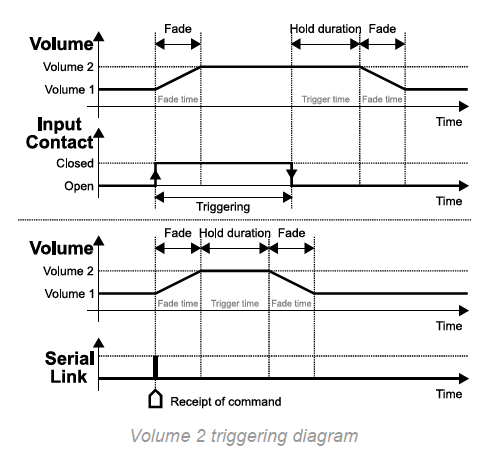
The input contact selects one of the two volume levels previously set on the Micro AMP 1.
- By default, the unit applies the main level, Volume 1.
- When the input contact closes, it applies the secondary level, Volume 2.
- Trigger time sets how long Volume 2 is maintained after the trigger ends.
- Fade time sets the fade duration between the two volume levels.
Connect a trigger
The connected device must act as an open or closed contact between the input and a ground connection on the unit.
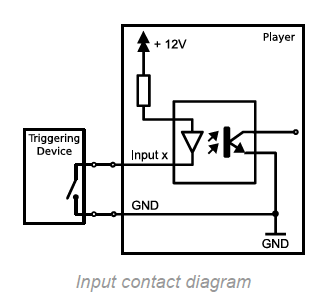
The trigger closes or opens the contact between the input and a ground connection on the unit.
Understand switching between the two volume levels
- When the contact is open and no trigger is active, Volume 1 is applied.
- When the contact closes, the unit switches to Volume 2 using the fade duration set by Fade time.
- When the contact opens again, Volume 2 is maintained for the duration set by Trigger time.
- The unit then returns to Volume 1 using the fade duration set by Fade time.
Was this article helpful?
That’s Great!
Thank you for your feedback
Sorry! We couldn't be helpful
Thank you for your feedback
Feedback sent
We appreciate your effort and will try to fix the article