The player can be programmed using a function called Scheduler. At a specified date and time, it can play an available audio source (Main Media content, web radio, auxiliary input, etc.), stop or resume playback, change the main volume, or update the Main Media content via FTP.
Note: This function depends on the player’s clock. See Setting the Clock of the Player.
Principle
The player uses its internal clock to execute scheduled actions at the specified date and time. These actions are stored in a timestamped programming file called the Scheduler file.
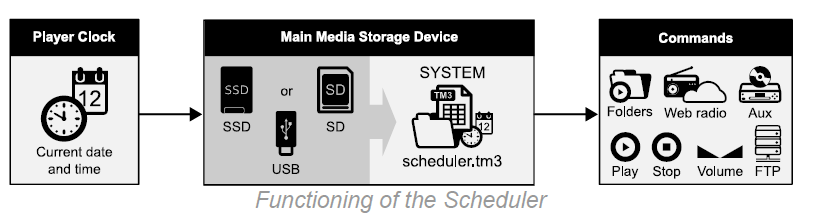
How timestamped programming works
The Scheduler file contains a calendar running from January 1, 2000 to December 31, 2037. Each date in the calendar refers to a daily action program called a day template.
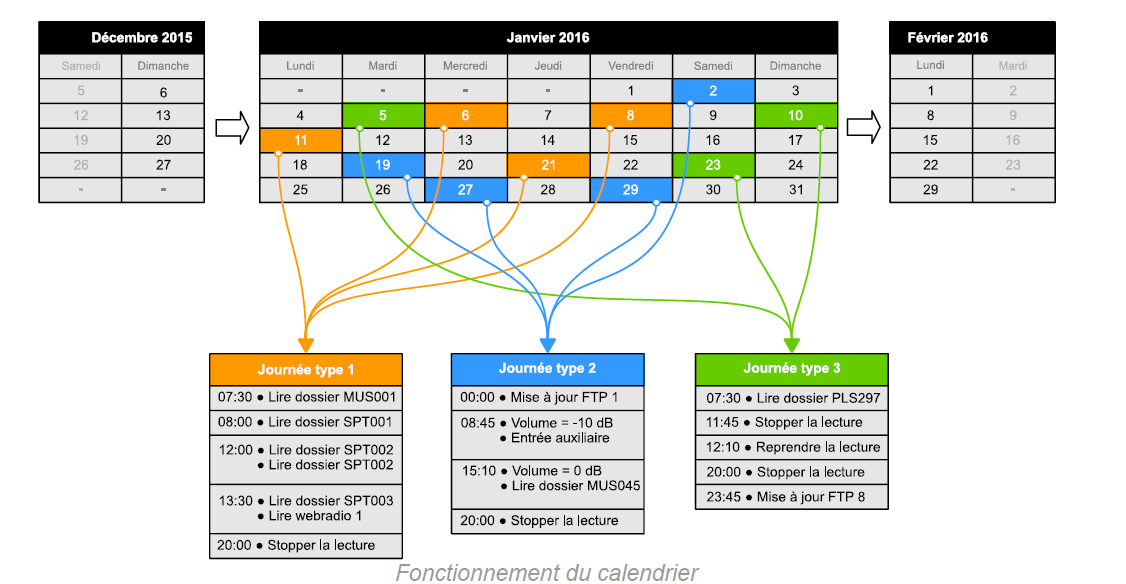
How the calendar works
- Dates that do not require any action are left empty and do not refer to a day template.
- Dates that require exactly the same sequence of actions refer to the same day template in the calendar.
A day template contains all the events scheduled for a single day, for each minute from 00:00 to 23:59. These events specify one or more commands (actions) to execute and the precise time at which they must be executed.
The Scheduler function works as follows:
- A Scheduler file can contain up to 255 different day templates.
- A day template can trigger an event every minute.
- An event is executed precisely at the change of minute.
- An event can execute up to 32 commands.
- The commands in an event are executed sequentially.
- Commands following a SPOT folder command wait until the SPOT folder has been played completely before they are executed.
- An event can be executed with or without priority:
- Priority: Playback stops immediately to execute the event’s commands.
- No priority: The player waits until the current track has finished before executing the event’s commands.
Priority depends on the initial playback state when the event occurs. The following table shows the possible sequences when No priority is selected for a scheduled event, depending on the player’s initial playback state.
| Initial playback state | Final playback state | ||||
|---|---|---|---|---|---|
| Playback stopped | MUSIC / PLAYLIST / SPOT | Web radio | Auxiliary input | Alternate Media | |
| Playback stopped | I | I | I | I | I |
| MUSIC / PLAYLIST / SPOT | ● | ● | ● | ● | ● |
| Web radio | I | I | I | I | I |
| Auxiliary input | I | I | I | I | I |
| Alternate Media | ● | ● | ● | ● | ● |
I: The event’s commands are executed immediately.
●: The event’s commands are executed at the end of the file currently playing.
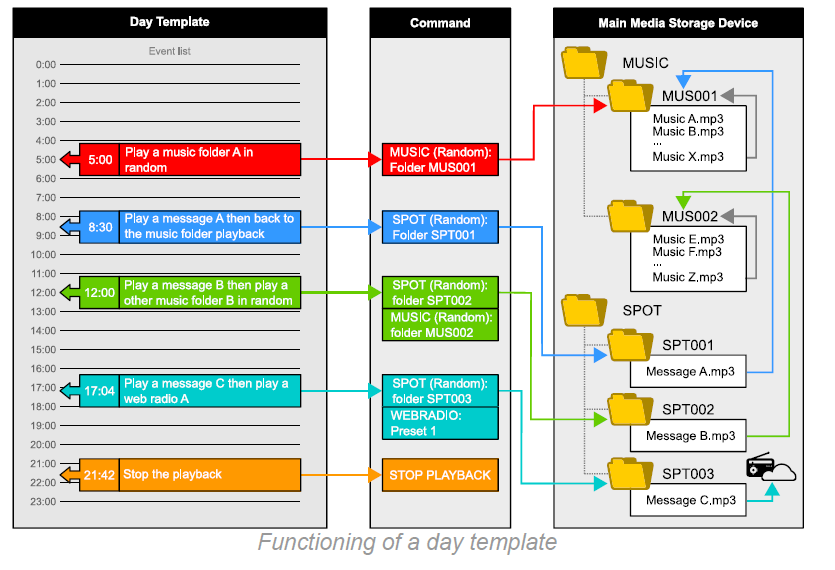
How a day template works
Command list
| Command | Description |
|---|---|
| MUSIC (Random) | Plays a MUSIC folder in random mode. Set a folder number from 1 to 999 (MUS001 to MUS999). |
| MUSIC (Random+Reset) | Plays a MUSIC folder in random mode and resets the playback history. Set a folder number from 1 to 999 (MUS001 to MUS999). |
| MUSIC (Sequential) | Plays a MUSIC folder in sequential mode. Set a folder number from 1 to 999 (MUS001 to MUS999). |
| MUSIC (Sequential+Reset) | Plays a MUSIC folder in sequential mode and resets the playback history. Set a folder number from 1 to 999 (MUS001 to MUS999). |
| PLAYLIST (Random) | Plays a PLAYLIST folder in random mode. Set a folder number from 1 to 999 (PLS001 to PLS999). |
| PLAYLIST (Random+Reset) | Plays a PLAYLIST folder in random mode and resets the playback history. Set a folder number from 1 to 999 (PLS001 to PLS999). |
| PLAYLIST (Sequential) | Plays a PLAYLIST folder in sequential mode. Set a folder number from 1 to 999 (PLS001 to PLS999). |
| PLAYLIST (Sequential+Reset) | Plays a PLAYLIST folder in sequential mode and resets the playback history. Set a folder number from 1 to 999 (PLS001 to PLS999). |
| SPOT (Random) | Plays a SPOT announcement folder in random mode. Set a folder number from 1 to 999 (SPT001 to SPT999). |
| SPOT (Sequential) | Plays a SPOT announcement folder in sequential mode. Set a folder number from 1 to 999 (SPT001 to SPT999). |
| SPOT X FILE(S) (Random) | Plays a specified number of files from a SPOT announcement folder in random mode. Set a folder number from 1 to 999 (SPT001 to SPT999) and a number of files from 1 to 255. |
| SPOT X FILE(S) (Sequential) | Plays a specified number of files from a SPOT announcement folder in sequential mode. Set a folder number from 1 to 999 (SPT001 to SPT999) and a number of files from 1 to 255. |
| RESUME PLAYBACK | Resumes playback. |
| STOP PLAYBACK | Stops playback. |
| VOLUME | Adjusts the main volume. Set the volume attenuation from 0 to -63 or select MUTE. |
| MUTE VOLUME | Enables or disables the player’s mute function (ON or OFF). |
| WEBRADIO | Plays a web radio. Set a web radio number from 1 to 10 (preset 1 to 10). |
| AUXILIARY INPUT | Switches the player to its auxiliary audio input. (My Music Player only) |
| FTP UPDATE | Starts a content update via FTP. Set an FTP server number from 1 to 10 (server 1 to 10). |
| SD-CARD | Plays an alternate storage device connected to the SD/SDHC memory card slot. (My Music Player only) |
| EXTERNAL USB | Plays an alternate storage device connected to the external USB host port. (My Music Player only) |
| INTERNAL USB | Plays an alternate storage device connected to the internal USB host port. (My Music Player only) |
| INTERNAL HDD | Plays an alternate storage device connected to the SATA connector. (My Music Player, HW V1.0 only) |
Create a timestamped programming file
The timestamped programming is stored in a TM3 file (scheduler.tm3), generated using the Scheduler software.
Important: The Scheduler file must be named exactly scheduler.tm3. The player ignores timestamped programming files with any other name.
Assign a schedule to the player
Once the scheduler.tm3 programming file has been created, copy it to the SYSTEM folder on the Main Media storage device.
The Scheduler programming file is copied in the same way as other files.
Was this article helpful?
That’s Great!
Thank you for your feedback
Sorry! We couldn't be helpful
Thank you for your feedback
Feedback sent
We appreciate your effort and will try to fix the article