The FTP Client page allows you to configure the FTP clients used to update content from remote FTP servers.
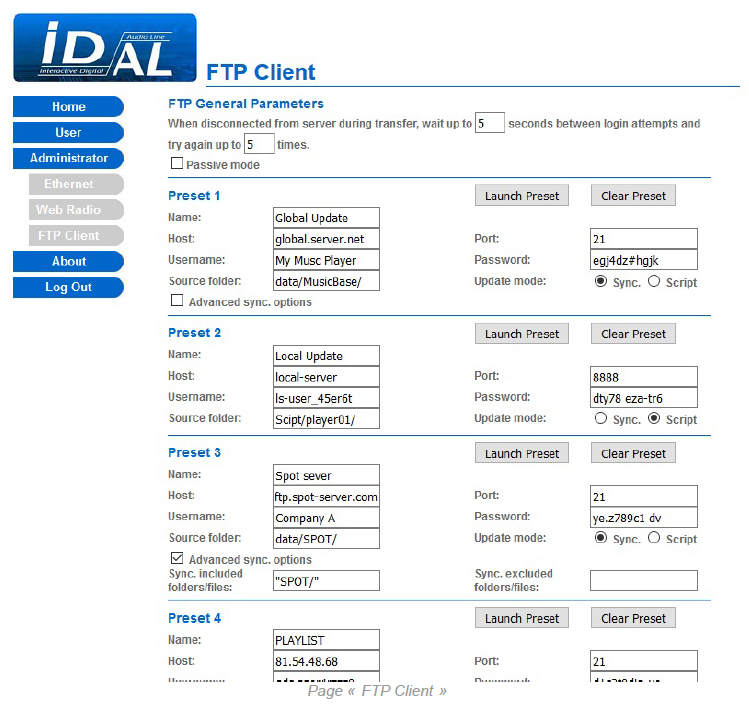
FTP General Parameters
| Wait up to | Sets the waiting time before reconnecting the player to the FTP server after disconnection, from 0 to 999 seconds (default: 5). |
|---|---|
| Try again up | Sets the number of attempts to connect the player to an FTP server before cancelling the update, from 0 to 99 attempts (default: 5). |
| Passive mode | Enables or disables passive mode for establishing the FTP connection port (default: disabled). |
Preset 1 to Preset 10
| Name | Sets an arbitrary name for the FTP client. |
|---|---|
| Host | Sets the address (URL) of the FTP server. |
| Port | Sets the FTP connection port number (default: 21). |
| Username | Sets the username for access to the FTP server. |
| Password | Sets the password for access to the FTP server. |
| Source folder | Sets the path on the FTP server from which the update will be performed. |
| Update mode | Sets the content update mode to Sync. (FTP synchronization) or Script (copy script) (default: Sync.). |
| Advanced sync. options | Enables or disables the advanced FTP synchronization options (default: disabled). |
| Sync. Included folders/files | Sets a list of file and folder paths to include in the FTP synchronization process. |
| Sync. excluded folders/files | Sets a list of file and folder paths to exclude from the FTP synchronization process. |
| Launch Preset | Starts the content update from the FTP server specified by the FTP client. |
| Clear Preset | Deletes the FTP client settings. |
The same options are available for all FTP client presets.
Save: Applies and saves all settings on the FTP Client page.
Was this article helpful?
That’s Great!
Thank you for your feedback
Sorry! We couldn't be helpful
Thank you for your feedback
Feedback sent
We appreciate your effort and will try to fix the article