TABLE OF CONTENTS
- Operating Mode
- Additional Parameters – Optional Tags
- [Jxxx] – Jump to Another Folder
- [RET] – Return to the Previous Folder
- [SEQ] or [RND] – Sequential or Random Playback
- [V+xx] or [V-xx] – Folder Volume Adjustment
- [NT] – Non-Interruptible Playback
- [RSxxx] – Send RS232 Commands
- [WHL] – Play While an Input Is Activated
- [NXTxxx] – Play a Specified Number of Audio Files
- [AUX] – Select the Auxiliary Audio Input
- [Rxxx] – Output Contact Control (EP230 Only)
Operating Mode
Folder and file names determine the playback mode. Files and folders must be named and organized according to the rules below.
Only one folder level is allowed at the root of the storage medium. Folder names consist of three digits, from 000 to 999, followed by optional parameters and a name of your choice.
Do not use special or accented characters.
Examples:
001003 [J002]034 folder name247 [V+02][SEQ] my folder
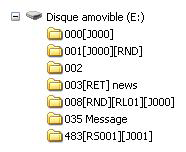
The first three digits identify the folder number. Folders are numbered from 000 to 999.
Examples:
- 000: Folder 000, the Autoplay folder played when the player is powered on.
- 001: Folder 1.
- 034: Folder 34.
The folder number identifies the folder to play at startup, when jumping to another folder, or when triggered by an input. Any number from 000 to 999 can be used.
Important: The four input contacts can trigger folders 001 to 015 according to a binary combination. The folder numbers assigned to the inputs can be modified by editing the config.txt file.
| Folder | Activated inputs |
|---|---|
| 001 | Input 1 |
| 002 | Input 2 |
| 003 | Inputs 1 + 2 |
| 004 | Input 3 |
| 005 | Inputs 1 + 3 |
| 006 | Inputs 2 + 3 |
| 007 | Inputs 1 + 2 + 3 |
| 008 | Input 4 |
| 009 | Inputs 1 + 4 |
| 010 | Inputs 2 + 4 |
| 011 | Inputs 1 + 2 + 4 |
| 012 | Inputs 3 + 4 |
| 013 | Inputs 1 + 3 + 4 |
| 014 | Inputs 2 + 3 + 4 |
| 015 | Inputs 1 + 2 + 3 + 4 |
Special case – Folder 000: When the player is powered on, it checks whether folder 000 exists. If the folder is present, its contents are played automatically. If it is absent, the player enters Stop mode.
The folder played by default at startup can be changed in the configuration menu.
Additional Parameters – Optional Tags
To change the player's behavior, optional parameters can be added to folder names. These parameters are enclosed in square brackets [ ]. Several tags can be combined in the same folder name.
- [Jxxx]: Jump to another folder after the current folder finishes playing, or create a playback loop.
- [RET]: Return to the previous folder after the current folder finishes playing.
- [RND] or [SEQ]: Select random or sequential playback.
- [V+xx] or [V-xx]: Temporarily adjust the volume.
- [NT]: Prevent playback from being interrupted.
- [RSxxx]: Send RS232 commands.
- [WHL]: Play a folder while its corresponding input remains activated.
- [NXTxxx]: Play a specified number of audio files from a folder.
- [AUX]: Select the auxiliary audio input after playback.
- [Rxxx] – EP230 only: Activate or deactivate output contacts.
Note: Without optional tags, the player plays all files in the selected folder in random order, then stops. Playback can be interrupted.
[Jxxx] – Jump to Another Folder
This tag specifies the folder to play after the current folder finishes. It can also be used to play a folder in a loop.
The xxx parameter is the destination folder number, written using three digits from 000 to 999.
Examples:
001 [J002]: Play folder 001, then jump to folder 002.003 [J003]: Repeat folder 003 continuously.008 [J023]: Play folder 008, then jump to folder 023.458 [J999]: Play folder 458, then jump to folder 999.
To play audio files continuously at startup, use folder 000 with the [J000] tag.
Example: 000[J000]
If the destination folder does not exist, playback stops.
If the destination folder contains no files but its name includes an optional tag, that tag is executed. If no playback option is specified, the player enters Stop mode.
[RET] – Return to the Previous Folder
This tag returns playback to the previously played folder after the current folder finishes.
When another folder containing the [RET] tag is triggered during playback, the player jumps to that folder, plays its contents, and then returns to the previous folder.
Several folders can jump to the same destination folder and then return to the folder that called it.
Examples:
001 [J100]: Play folder 001, then jump to folder 100.002 [J100]: Play folder 002, then jump to folder 100.100 [RET]: Play folder 100, then return to the previous folder (001 or 002).
In this example, folders 001 and 002 both jump to folder 100. After folder 100 finishes, playback resumes in the folder that most recently called it.
Note: The [RET] tag supports only one return level. The return destination is always the previously played folder.
[SEQ] or [RND] – Sequential or Random Playback
These tags define the playback order within the current folder. By default, folders are played in random order.
- [SEQ]: Play files in numerical order.
- [RND]: Play files in random order. This is also the default when no tag is specified.
Examples:
001[SEQ]: Play folder 001 in numerical order, then stop.002[RND][J002]: Play folder 002 continuously in random order.003[J001]: Play folder 003 in random order, then jump to folder 001.
With [SEQ], files are sorted according to the numerical values at the beginning of their names. Files can be numbered from 001 to 999.
In sequential mode, files without numerical prefixes are ignored.
Folders that do not follow the naming rules are ignored.
[V+xx] or [V-xx] – Folder Volume Adjustment
These tags temporarily increase or decrease the output volume while a folder is playing. They can be used to play certain messages louder or quieter than other content.
Volume changes are relative to the player's main volume setting.
The xx parameter specifies the number of volume steps to increase or decrease, from 00 to 64.
Examples:
001 [V+05]: Increase the volume by five steps while folder 001 is playing.001 [V-03]: Decrease the volume by three steps while folder 001 is playing.
At the end of the folder, the volume returns to its previous level.
If the requested change exceeds the player's maximum or minimum volume, the volume is limited to the corresponding maximum or minimum value.
[NT] – Non-Interruptible Playback
This tag determines whether playback of the current folder can be interrupted.
When [NT] is included in a folder name, playback cannot be interrupted and incoming commands are ignored.
Without this tag, playback can be interrupted at any time by an external action, such as an input contact or RS232 command.
Example:
001 [NT]: Folder 001 cannot be interrupted.
Any command received through an input contact, RS232, or another control method is ignored while the folder is playing.
Important: Ignored trigger commands are not stored. The triggering information is lost.
Note: The [NT] tag applies only to folder change commands. PLAY, STOP, NEXT FILE and PREVIOUS FILE commands are executed immediately.
[RSxxx] – Send RS232 Commands
This tag allows bytes to be transmitted through the RS232 output.
When the folder is triggered, a sequence of bytes is sent over the serial connection to control another device, such as another player, a switching matrix, or a video projector.
The bytes to be transmitted are defined in a dedicated text file.
Default serial settings: 19200 baud, 8 data bits, no parity, 1 start bit, 1 stop bit.
The baud rate can be changed using the config.txt file.
The xxx parameter in [RSxxx] identifies the serial command to transmit. It corresponds to a line number in the serial.txt file and must contain three digits, from 001 to 999.
For example, [RS002] sends the byte sequence defined on line #002 of the serial.txt file.
Creating the serial.txt File
The file must be named serial.txt and placed at the root of the storage medium (SD/SDHC card or USB flash drive).
It must be a plain-text file, created using a text editor such as Windows Notepad. Save the file using ANSI encoding and do not use special characters.
Each line contains a sequence of hexadecimal byte values, from 00h to FFh, separated by spaces. Enter only the two hexadecimal characters for each byte, without the "h" suffix.
Each command line begins with:
#xxx: where xxx identifies the command number corresponding to the [RSxxx] tag.
Example:
#001:45 85 63 21 78 A5 B2
#002:98 75 21 35 45 98
#100:21 35 45 78 A5 B2
Comments can be added using two forward slashes (//).
// Example file
#001:05 A1 FF E4 // Comment on this line
#005:45 85 63 21 78 A5 B2
#100:98 75 35 45 98 // My command

// Another command
#064: 48 25 Ce 8b

#128:4C 8E D9 5A //
#999:a4 Fc 48 3e 8B
// Comments at the end of the file
Example of a command to start playback of folder 001 on another MicroPlayer mkIII:
#001:80 01 01
Examples of folder tags:
001[RS001]: Send the bytes defined on line #001 of serial.txt when folder 001 is played.002[RS064]: Send the bytes defined on line #064 of serial.txt when folder 002 is played.
Note: If a folder is played in a loop, the RS232 message defined by [RSxxx] is sent each time the folder loops.
Example:
001[J001][RS099]: Play folder 001 continuously. Each time the folder loops, transmit the message defined on line #099 of serial.txt.
[WHL] – Play While an Input Is Activated
This tag plays a folder for as long as its corresponding input remains activated.
While the input is active, the folder plays in a loop. When the input is deactivated, the player executes any tags that define what happens when leaving the folder.
Examples:
001[WHL]: Play folder 001 continuously while input 1 is activated. Stop when input 1 is deactivated.002[WHL][J045]: Play folder 002 continuously while input 2 is activated. When input 2 is deactivated, play folder 045.003[WHL][J999]: Play folder 003 continuously while inputs 1 and 2 are activated. When the input combination is released, play folder 999.
The player's dry-contact inputs use combinations. Any change in the combination of activated inputs is detected and taken into account immediately.
Examples:
000[J000]: Play folder 000 continuously at startup.001[WHL][J000]: Play folder 001 continuously while input 1 is activated. If input 2 is also activated, play folder 003.002[WHL][J000]: Play folder 002 continuously while input 2 is activated. If input 1 is also activated, play folder 003.003[WHL][J000]: Play folder 003 continuously while inputs 1 and 2 are activated. If input 1 is deactivated, play folder 002. If input 2 is deactivated, play folder 001.
[NXTxxx] – Play a Specified Number of Audio Files
This tag plays a specified number of audio files from a folder.
When the requested number of files has been played, the player executes any tags that define what happens when leaving the folder.
If the requested number is greater than the number of audio files available in the folder, playback loops through the folder as many times as necessary to reach the requested number.
The player keeps track of previously played files. Files already played by an earlier [NXTxxx] command are not repeated until all files in the folder have been played.
The xxx parameter specifies the number of files to play, written as three digits from 001 to 999.
Examples:
001[NXT003]: Play three randomly selected audio files from folder 001, then stop.002[NXT001][J000]: Play one audio file from folder 002, then play folder 000.003[NXT005][RET]: Play five audio files from folder 003, then return to the previously played folder.004[NXT002][SEQ][J000]: Play the next two files in numerical order from folder 004, then play folder 000.
[AUX] – Select the Auxiliary Audio Input
This tag selects the auxiliary audio input after the current folder finishes playing.
The EP220 and EP230 players have an auxiliary audio input that can be connected to an external audio source, such as a satellite receiver, computer, or another audio player.
The player can be integrated into the main audio system to broadcast messages, information, or music.
It can be used for local audio insertion or as a backup system if the main audio source fails.
When playback is triggered by a schedule or an external command (input contact, Ethernet, or serial connection), the auxiliary audio is faded out and the selected folder is played.
When the auxiliary input is selected again, its audio level is restored with a fade-in.
To leave auxiliary mode and play a folder, trigger playback using an input contact, scheduled event, RS232 command, or Ethernet command.
Example:
001 [AUX]: Play the contents of folder 001, then switch to the auxiliary input.
Special Behavior
- If a requested folder does not exist, playback stops.
- If a triggered folder contains no files but its name includes an optional tag, that tag is executed. If no playback option is specified, the player enters Stop mode.
[Rxxx] – Output Contact Control (EP230 Only)
This tag activates or deactivates one or more output contacts.
The EP230 can control its outputs directly through playback tags without additional programming. Depending on the connected equipment, these outputs can be used to control lighting, relays, or other devices.
Important: Output states cannot change during playback of a file using this tag. To change output states during playback, use the Show Control function.
Examples:
001[R001]: Activate output 1 when folder 001 is played.002[R255]: Activate all eight outputs when folder 002 is played.004[R000]: Deactivate all outputs when folder 004 is played.
Values range from 000 to 255 and follow a binary progression.
Outputs are switched at the beginning of file playback. If subsequent files do not contain an output switching tag, the outputs retain their current state and are not automatically deactivated.
When a Show Control event file is played, output states can change according to the event scenario.
For more precise output control, it is recommended to manage output switching within the Show Control scenario rather than combining different control methods.
Was this article helpful?
That’s Great!
Thank you for your feedback
Sorry! We couldn't be helpful
Thank you for your feedback
Feedback sent
We appreciate your effort and will try to fix the article