The Micro AMP 1 RS-232 link can receive commands and send status information.
Default settings
| Baud rate | 19,200 baud |
|---|---|
| Start bits | 1 |
| Data bits | 8 |
| Parity | None |
| Stop bits | 1 |
| Handshake | None |
Received command format
Each frame contains three bytes in this order: Status, Command, Data.
80h: addresses all units.81htoFFh: addresses a unit with ID 001 to 127.
| Command | Function | Documented data |
|---|---|---|
03h | Set the main volume (Volume 1) | 00h to 38h |
04h | Request settings and general information | 40h |
08h | Set the RS-232 baud rate | 30h: 4,800; 31h: 9,600; 32h: 19,200 baud |
09h | Activate the secondary volume (Volume 2) | 01h |
7Fh | Set the RS-232 unit ID | 01h to 7Fh |
How the Volume 2 activation command behaves
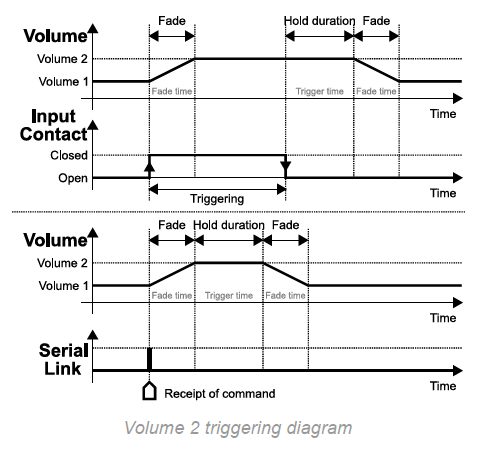
The diagram shows that, when the command is received, the unit switches from Volume 1 to Volume 2 using the Fade time setting. It then maintains Volume 2 according to Trigger time before returning to Volume 1 using Fade time.
Was this article helpful?
That’s Great!
Thank you for your feedback
Sorry! We couldn't be helpful
Thank you for your feedback
Feedback sent
We appreciate your effort and will try to fix the article