By inserting the EventPlayer mkII into an audio system, between an audio source (a computer, a satellite receiver, a multi-CD player, a tuner, etc.) and the amplifier, you can trigger messages according to a schedule, via input contacts or over a network.
The player acts as a message centre for delivering local announcements (news, adverts), operating a sales assistant call system, or managing in-store entertainment just as a compère would.
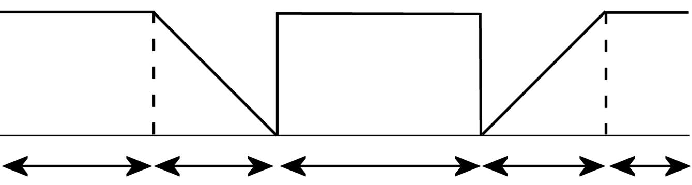
Switching to the auxiliary input is controlled by the folder name (see Chapter 4). When a command is received to mute the auxiliary input to broadcast a message, the sound from the auxiliary input fades out, i.e. the volume is reduced to 0. Once the message(s) have been broadcast and a command to return to the auxiliary input has been issued, the sound from the external source fades back in, i.e. increases from 0 to maximum volume. The fade-in and fade-out times are adjustable in the options menu.
Was this article helpful?
That’s Great!
Thank you for your feedback
Sorry! We couldn't be helpful
Thank you for your feedback
Feedback sent
We appreciate your effort and will try to fix the article