Several settings can be accessed using the DATA knob to configure the EventPlayer mkII player.
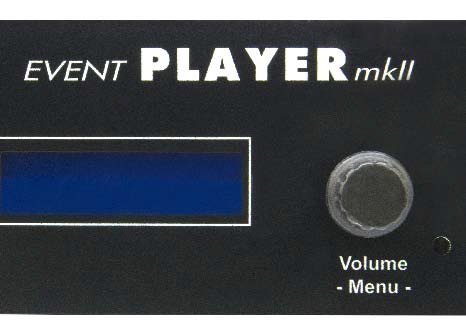
The DATA knob has two functions:
- Continuous rotation in both directions.
- Push-button confirmation.
When the player is in normal operating mode (i.e. outside the configuration menus), rotating the knob adjusts the output volume.
Press the knob to access the configuration menus:
- Source selection (Player or Auxiliary)
- Tone adjustment for the player or auxiliary input
- Date and time settings
- Ethernet connection settings
- RS232 serial connection settings
- Miscellaneous options (Button assignment, Fade in/out, Autoplay, etc.)
- Display language selection
Using the DATA Knob in the Options Menu
- Rotate the knob to select a menu, then press it to confirm your selection.
- Rotate the knob to change a parameter value. Press it to confirm the setting and return to the previous menu or move to the next field.
- To exit the menu, rotate the knob until "Back" or "Exit" appears, then press it to confirm.
Reading the LCD Display
The menu name appears on the first line, with the corresponding parameter value displayed below it. Press the knob to modify this value.
Volume control: Rotate the DATA knob to adjust the volume.
Warning: The volume can also be adjusted via the serial connection, Ethernet, or file names.
To adjust the player's volume, select the "MAIN" source in the "SOURCE" menu.
To adjust the auxiliary input volume, select the "AUX" source in the "SOURCE" menu.
First-level menu options:
| Menu | Description |
|---|---|
| SOURCE Main | Selects either the player or the auxiliary input. Displays the selected source (Main or Aux). |
| EQUALIZER B:00 / M:00 / T:00 | Adjusts the tone settings for the player or auxiliary input. Displays the current values: B for Bass, M for Midrange, T for Treble. |
| DATE / TIME 01/01/2008 00:00 | Sets the player's date and time. |
| ETHERNET 192.168.1.1 | Configures the Ethernet connection settings. Displays the player's default IP address. |
| RS232 SERIAL 001 / 19200 / OFF | Configures the RS232 serial connection settings. Default values: player ID, baud rate, and monitoring mode. |
| OPTIONS | Configures various settings such as button assignment, fade in/out, and amplifier control. |
| LANGUAGE French | Selects the display language. Available languages: French and English. |
| EXIT | Exits the options menu and returns to normal operation. |
Was this article helpful?
That’s Great!
Thank you for your feedback
Sorry! We couldn't be helpful
Thank you for your feedback
Feedback sent
We appreciate your effort and will try to fix the article