The EP220 and EP230 players can communicate with other devices. They can receive commands through their Rx input or transmit information through their Tx output. Both players support the RS232 standard.
Default settings: 19200 baud - 8 data bits - No parity - 1 start bit - 1 stop bit.
The baud rate can be changed using the config.txt file.
Reception Protocol
Using the reception protocol, the player can receive commands to start playing a folder or adjust the volume. When several players share the same serial connection, each player responds to its own ID or to a global command.
The reception protocol uses a 3-byte frame.

Reminder:
- One byte consists of 8 bits: b7 b6 b5 b4 b3 b2 b1 b0.
- A byte can be represented in binary as 10000000b or in hexadecimal as 80h.
Byte 1: Status - 1xxxxxxxb
The status byte is used for frame synchronization. Its most significant bit (b7) is always set to 1. All other bytes (commands or data) have their most significant bit set to 0.
- b7 = 1: identifies a status byte.
- b6 - b0: identifies the player to be addressed, from 001 to 127 (0000001b - 1111111b).
The default player address is 001. It can be changed in the config.txt file.
Several players can share the same ID to create groups.
ID 000 is the global address. All players respond to a command sent to this address.
Examples of ID addresses:
- 80h = Global command for all players
- 81h = Player No. 001
- 9Eh = Player No. 030
- FFh = Player No. 127
Byte 2 (Command) 0xxxxxxxb + Byte 3 (Data) 0xxxxxxxb
Byte 2 contains the command, and byte 3 contains the data associated with that command. A command byte is always followed by a data byte. A complete frame therefore consists of 3 bytes.
- b7 = 0: identifies a command or data byte.
- b6, b5, b4: bank selection for the folder jump command.
- b3, b2, b1, b0: command code sent to the player.
Command list:
- 00h: Not used
- x1h (01h to 71h): Jump to a folder
- 02h: Transport command
- 03h: Volume adjustment
00h - 00000000b: Not used
01h to 71h - 0xxx0001b: Jump to a folder
The folder is identified by the bank number and the following data byte.
xxx represents the bank number. To address 1,000 folders (000 to 999), the folder numbers are divided into banks of 128 values.
- 0xxx0001b: xxx = bank number according to the folder number
- 01h - 00000001b: Bank 0 - 000 to 127
- 11h - 00010001b: Bank 1 - 128 to 255
- 21h - 00100001b: Bank 2 - 256 to 383
- 31h - 00110001b: Bank 3 - 384 to 511
- 41h - 01000001b: Bank 4 - 512 to 639
- 51h - 01010001b: Bank 5 - 640 to 767
- 61h - 01100001b: Bank 6 - 768 to 895
- 71h - 01110001b: Bank 7 - 896 to 999 (binary values above 999 are ignored).
Calculation method:
- Bank = select the bank corresponding to the folder number from the list above.
- Value = folder number - (bank number x 128).
Example of a frame that starts playback of folder 278 on player No. 001:
Folder number = 278
- 278 belongs to bank 2 (256 to 383).
- Value = 278 - (2 x 128) = 22.
The frame is: 81 21 16
- Byte 1: 81h - 10000001b: status byte, player No. 001
- Byte 2: 21h - 00100001b: bank 2, jump command
- Byte 3: 16h - 00010110b: value 22
02h - 00000010b: Transport Command
The function is defined by the following data byte.
Byte 3 data values:
- 01h - 00000001b: Play
- 02h - 00000010b: Stop
- 03h - 00000011b: Next track in the current folder
- 04h - 00000100b: Previous track in the current folder
- 05h - 00001001b: Not used
- 06h - 00001010b: Next folder
- 07h - 00001011b: Previous folder
Note: All other values are ignored.
Example of a complete frame: 81 02 01
- Byte 1: 81h - 10000001b: status byte, player No. 001
- Byte 2: 02h - 00000010b: transport command
- Byte 3: 01h - 00000001b: play command
03h - 00000011b: Volume Adjustment
The volume is defined by the following data byte.
Byte 3 accepts values from 0 to 64.
- 00h - 00000000b: Mute - volume set to zero
- 20h - 00100000b: Half volume - value 32
- 40h - 01000000b: Maximum volume - value 64
Note: Values above 64 are ignored.
Example of a complete frame: 81 03 0E
- Byte 1: 81h - 10000001b: status byte, player No. 001
- Byte 2: 03h - 00000011b: volume command
- Byte 3: 0Eh - 00001110b: volume set to 14
Transmission Protocol - Monitoring
The EP220 and EP230 players can transmit several types of data through the RS232 port:
- Custom data transmitted using [RSxxx] tags.
- Player control data retransmitted in Daisy Chain mode.
- Player status data transmitted in Monitoring and Extended Monitoring modes.
Four monitoring modes are available to determine the type of data transmitted through the RS232 port.
The monitoring mode is configured in the player's settings menu.
Daisy Chain and monitoring modes can be used alongside data transmission using tags.
Mode 0: No Monitoring
Only data defined by [RSxxx] tags is transmitted through the Tx output.
Mode 1: Daisy Chain
In this mode, all data received on the Rx line is retransmitted unchanged through the Tx line.
This allows several players to be connected in a chain. Connect the Tx output of the first player to the Rx input of the second player, and continue in the same way for subsequent players.
Information received by the first player through its Rx input is forwarded to all other players in the chain.
Warning: When many players are connected in this way, a slight delay may occur at the end of the chain.
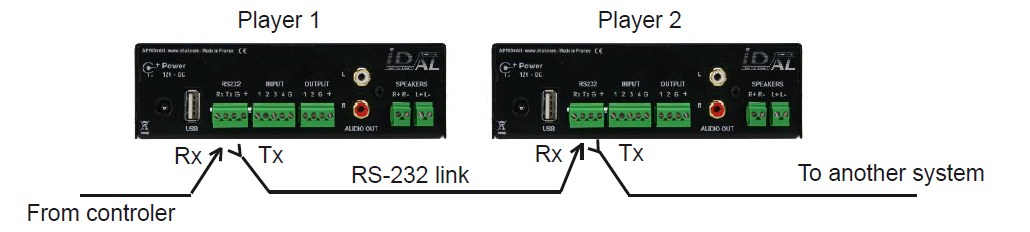
Mode 2: Monitoring
In this mode, the player transmits information through its Tx output according to the actions it performs. This mode does not allow players to be daisy-chained.
Monitoring allows a controller, computer, or safety system to determine the player's status and perform operational checks. The player transmits its status whenever it changes.
The transmission protocol uses a 3-byte frame, similar to the reception protocol.
Byte 1: Status
- b7 = 1: identifies the status byte.
- b6 - b0: identifies the transmitting player, from 001 to 127 (0000001b - 1111111b).
The default player address is 001 (81h). It can be changed using the config.txt file.
Byte 2: Command
Single value: 00h - 00000000b
Byte 3: Data
- 00h - 00000000b: Player ready - Indicates that the player is ready and available after power-up and completion of the startup sequence.
- 01h - 00000001b: Not used
- 02h - 00000010b: Not used
- 03h - 00000011b: Playback started - Sent when the player enters playback mode.
- 04h - 00000100b: Playback ended - Indicates that the player has finished playing the current file.
All other values are not used.
Example of a sequence used to verify that the player is operating correctly by playing an audio file.
Preparation: Assume that the player ID is 001.
- Create a folder named "001" and copy an audio file (myfile.mp3) into it.
- Start playback of folder "001" by activating input contact 1 or sending an RS232 command. When playback begins, the player transmits the playback-start frame: 81h 00h 03h.
- When playback of the file ends, the player transmits the playback-end frame: 81h 00h 04h.
Mode 3: Extended Monitoring
Extended Monitoring provides the same functions as standard Monitoring mode, with the addition of continuous status transmission.
A frame is transmitted every 250 ms to indicate one of two possible player states:
- 01h - 00000001b: The player is not playing and is waiting for a command.
- 02h - 00000010b: The player is playing a file.
This mode is used for safety message management. If an expected frame is missing, a fault can be detected and corrective action can be taken.
Was this article helpful?
That’s Great!
Thank you for your feedback
Sorry! We couldn't be helpful
Thank you for your feedback
Feedback sent
We appreciate your effort and will try to fix the article