When a new playback command occurs, audio fades provide progressive transitions between the initial and final playback states.
- Fade-out on the initial playback state: reduces the player’s volume from its current level to the minimum level (mute) over a defined duration.
- Fade-in on the final playback state: increases the player’s volume from the minimum level (mute) to its current level over a defined duration.
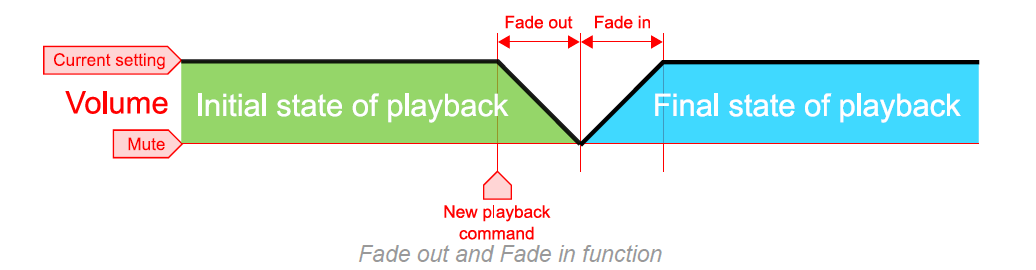
To provide a smooth transition, the player applies the following rules:
- Although the fade-out duration is set to a specific value, it can change dynamically according to the playback context. The duration is automatically reduced if the remaining time of the file currently playing is shorter than the configured fade duration.
- When the player plays local content, no fade-in is required when a playback command calls content from the Main Media or an alternate storage device.
Initial and final playback states
Each cell shows the transition as fade-out / fade-in.
| Initial playback state | Final playback state | ||||
|---|---|---|---|---|---|
| Stopped | Music / Playlist / Spot | Web radio | Auxiliary input | Alternate storage device | |
| Stopped | — / — | — / — | — / — | — / — | — / — |
| Music / Playlist / Spot | Out / — | Out / — | Out / In | Out / In | Out / — |
| Web radio | Out / — | Out / — | Out / In | Out / In | Out / — |
| Auxiliary input | Out / — | Out / — | Out / In | Out / In | Out / — |
| Alternate storage device | Out / — | Out / — | Out / In | Out / In | Out / — |
Set fade-out and fade-in durations
Procedure
Select a duration from 0 seconds (no fade) to 5 seconds for the fade-in and fade-out settings.
Methods
| Method | Procedure |
|---|---|
| Advanced menu | Go to ADMINISTRATOR → FADE IN/OUT → IN and OUT, then set a duration from 0 to 5 seconds. |
| Web browser | On the Administrator page, set Fade-in(s) and Fade-out(s) to a duration from 0 to 5, then click Save at the bottom of the page. |
Configuration file (system.ini) | See Settings of the Parameters with the “system.ini” File (page 63). |
Was this article helpful?
That’s Great!
Thank you for your feedback
Sorry! We couldn't be helpful
Thank you for your feedback
Feedback sent
We appreciate your effort and will try to fix the article